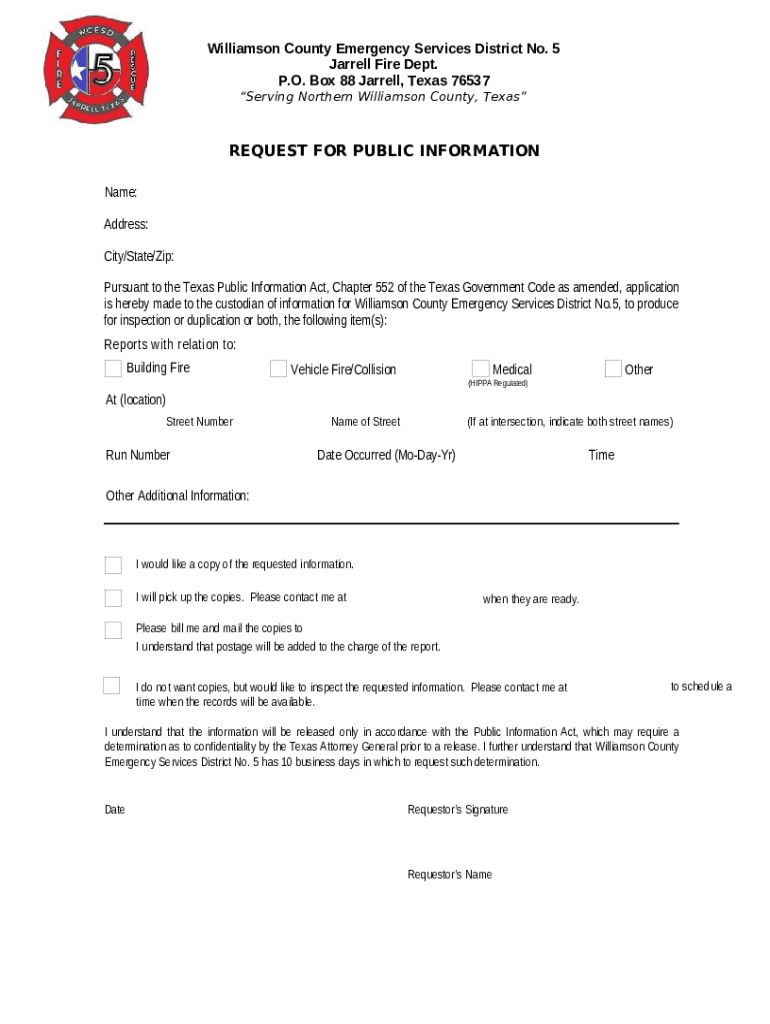
Williamson County Emergency Services District No. 5 Jarrell Fire Dept. P.O. Box 88 Jarrell, Texas 76537 Serving Northern Williamson County, TexasREQUEST FOR PUBLIC INFORMATION Name: Address: City/State/Zip: PursuanttotheTexasPublicInformationAct,Chapter552oftheTexasGovernmentCodeasamended,application isherebymadetothecustodianofinformationforWilliamsonCountyEmergencyServicesDistrictNo.5,to.
Loading

Open form follow the instructions

Easily sign the form with your finger

Send filled & signed form or save
How to fill out the TX Williamson County Emergency Services District 5 Request For Public Information online
Filling out the TX Williamson County Emergency Services District 5 Request For Public Information form is an important step in accessing public records. This guide provides a user-friendly, step-by-step approach to ensure you successfully complete the form online, meeting your information needs.
Follow the steps to complete your request for public information online.
- Press the ‘Get Form’ button to access the form and open it in your preferred digital format.
- In the first section, provide your name. Ensure that the name matches your official identification.
- Next, enter your address, making sure to include all necessary details such as street number and street name.
- Fill in the city, state, and ZIP code fields to ensure accurate delivery of any copies or information requested.
- Indicate the specific reports you are requesting. You can select from options such as Building Fire, Vehicle Fire/Collision, Medical, or specify ‘Other’ if applicable.
- If your request is related to an incident, provide the location details by entering the street number and name. If it is at an intersection, include both street names.
- Next, input the date the incident occurred in the format Mo-Day-Year.
- Provide the time of the occurrence, if known, to help pinpoint the specific records requested.
- Use the Additional Information field to add any other details that may assist in processing your request.
- Choose how you would like to receive the information by checking one of the options — either by picking up the copies, having them mailed to you, or opting for an inspection of the records.
- If you wish to be contacted regarding the availability of your records, provide your contact information in the appropriate field.
- Finally, review the understanding statement regarding the Texas Public Information Act and realize the potential for delays due to confidentiality evaluations.
- Date and sign the form where indicated. Ensure that your signature matches the name provided.
- Once all fields are accurately filled out, you can save the changes, download the completed form, print it for physical submission, or share it as needed.
Complete your TX Williamson County Emergency Services District 5 Request For Public Information online today to access vital public records.
Experience a faster way to fill out and sign forms on the web. Access the most extensive library of templates available.
Related content
protecting & promotingthe health of williamson county · COMMUNITY ASSESSMENT FOR PUBLIC...
TEMPLE COLLEGE. MASTER EMERGENCY MANAGEMENT PLAN. I. Authority. A. This plan has been...
TEXAS DEPARTMENT OF STATE HEALTH SERVICES. CENTER FOR HEALTH STATISTICS. Health Care...
Get answers to your most pressing questions about US Legal Forms API.
What is the phone number for Williamson County Court records?
For questions regarding citation issuance or for special urgent handling please contact the District Clerk's office at (512) 943-1212.
How do I contact Williamson County prisoners?
Call Jail Information at (512) 943-1365 for all information about people in jail.
How do I get a copy of a police report in Williamson County?
If you are looking for a copy of your incident report, arrest report or incarceration verification, please call 512-943-1300 and push option 5.
How do I report an abandoned vehicle in Williamson County Texas?
The Vehicle Abatement Unit will now handle abandoned vehicles.To report an abandoned vehicle, call 311 or submit a service request electronically to 3-1-1 here.
How do I find out if I have a warrant in Williamson County?
You can call them at 512-943-1100 with any questions pertaining to records. If you go in person they charge $1 for each page and $5 for a certified document. If you have been a victim of a crime in Texas you can access the Statewide VINE system to obtain information regarding the status of an offender.
How much is recording fees in Williamson TX?
To record a document in the real property records, the fee is $21 for the first page and $4 for each additional page or fraction of a page. Each name to be indexed after the first five names is 25 cents (50 cents for DBAs).
Who owns Williamson County Jail?
The building is now owned by the Williamson County Illinois Historical Society and operated as the Williamson County Museum. Several rooms have been restored to a Victorian-era period, and other rooms feature historic small businesses, military and clothing displays, a schoolroom and the original jail cells.
How do I change my name in Williamson County Texas?
A name change petition is filed in the District Clerk's office and requires specific statutes to be followed. The Texas Family Code Chapter 45 sets out the law regarding doing a name change for adults as well as minors. A filing fee is paid at the time of filing of the petition in the clerk's office.
Use professional pre-built templates to fill in and sign documents online faster. Get access to thousands of forms.
If you believe that this page should be taken down, please follow our DMCA take down process here.