Get Uk Co1
How it works
-

Open form follow the instructions
-

Easily sign the form with your finger
-

Send filled & signed form or save
How to fill out the UK CO1 online
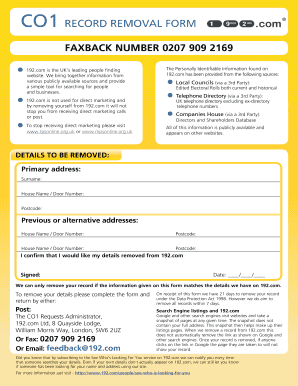
The UK CO1 form is essential for individuals who wish to remove their personal information from the 192.com database. This guide will provide you with step-by-step instructions on how to effectively complete this form online.
Follow the steps to successfully complete the UK CO1 form.
- Click 'Get Form' button to obtain the form and open it in the editor.
- Begin by entering your primary address in the designated field. Make sure to include the full address and postcode accurately to ensure a successful removal request.
- In the next section, provide your surname. This is crucial for matching your details with the records held by 192.com.
- If you have previous or alternative addresses that need to be removed, list each full address along with the corresponding postcodes in the specified sections.
- After all addresses are filled, review the information to ensure that everything matches your details on 192.com, as mismatches may result in non-removal.
- Sign the form in the designated area to validate your request.
- Finally, enter the date when you completed the form and proceed to save your changes. You can then choose to download, print, or share the completed form as needed.
Take control of your personal information by completing the UK CO1 form online today.
You can upload the CO1 form through the official government portal or your local educational institution's website. It’s essential to follow the specified upload guidelines to ensure your submission is processed smoothly. Additionally, make sure you have all required documents ready before uploading. If you need further assistance with the CO1 form, the USLegalForms platform offers user-friendly solutions to help streamline your experience.