We use cookies to improve security, personalize the user experience, enhance our marketing activities (including cooperating with our marketing partners) and for other business use.
Click "here" to read our Cookie Policy. By clicking "Accept" you agree to the use of cookies. Read less
Read more
Accept
Loading
Form preview
  • US Legal Forms
  • Form Library
  • More Forms
  • More Multi-State Forms
  • Nc Blasting Permit Application - City Of Raleigh 2019

Get Nc Blasting Permit Application - City Of Raleigh 2019-2025

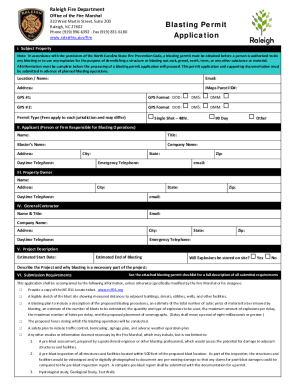
Raleigh Fire Department Office of the Fire Marshal310 West Martin Street, Suite 200 Raleigh, NC 27602 Phone (919) 9966392 Fax (919) 8316180 www.raleighnc.gov/fireBlasting Permit Application. Subject.

How it works

  1. Open form

    Open form follow the instructions

  2. Easily sign form

    Easily sign the form with your finger

  3. Share form

    Send filled & signed form or save

How to fill out the NC Blasting Permit Application - City Of Raleigh online

This guide provides clear and supportive instructions for filling out the NC Blasting Permit Application for the City of Raleigh online. It aims to assist users unfamiliar with legal documentation and ensures all necessary information is correctly submitted.

Follow the steps to complete the application process efficiently.

  1. Click ‘Get Form’ button to obtain the form and open it in the editor.
  2. Fill in the Subject Property section. Include the location/name, email, address, iMaps Parcel ID, and GPS coordinates. Ensure all details are accurate to avoid processing delays.
  3. Complete the Applicant section by providing the name, title, blaster's name, company name, address, city, state, telephone numbers, and email for the person or firm responsible for the blasting operations.
  4. Provide information in the Property Owner section. This should include the name, address, city, state, daytime telephone, zip code, and email of the property owner.
  5. In the General Contractor section, fill out the name and title, email, company name, address, city, state, telephone numbers, and zip code for the general contractor involved in the project.
  6. Describe the project in the Project Description section. Include the estimated start date, end date of blasting, whether explosives will be stored on-site, and a detailed project description explaining why blasting is necessary.
  7. Review the Submission Requirements and attach all necessary documents, including the NC 811 Locate ticket, a legible sketch of the blast site, a blasting plan, a safety plan, and any other studies or information required.
  8. Check the Liability Insurance Required section and ensure any necessary insurance or surety bond documentation is included.
  9. Read and agree to the Permit Conditions, ensuring to understand the regulations related to blasting operations.
  10. In the Certification and Signature section, the applicant must sign and date the application, certifying the accuracy of the information provided.
  11. Finally, submit the completed application via email, mail, or in person as indicated in the permit instructions, ensuring to save or print a copy for your records.

Complete your NC Blasting Permit Application online today to ensure timely processing and compliance with regulations.

Get form

Experience a faster way to fill out and sign forms on the web. Access the most extensive library of templates available.
Get form

Related content

Blasting Permit Application
Note: In accordance with the provisions of the North Carolina State Fire Prevention Code...
Learn more
TC-6-11 Fire Prevention Ordinance Text Changes...
Apr 19, 2011 — Amends the City Code to provide consistency between City regulations and...
Learn more
Commercial Driver's Manual: Table of Contents
This manual describes the minimum requirements for obtaining a. Commercial Driver's...
Learn more

Related links form

Borang Permohonan Visa Adac Kaufvertra Account ApplicAtion Choice Personal Accounts Only Wfg Launch

Questions & Answers

Get answers to your most pressing questions about US Legal Forms API.

Contact support

Yes. One of the facts to which the property owner (or person legally authorized to act on behalf of the firm or corporation owning the property) must attest in the affidavit is that he or she will be personally present at all building inspections required by the North Carolina State Building Code.

You need a building permit for all construction that involves the construction, reconstruction, alteration, repair, movement to another site, removal, or demolition of any building or structure. All electrical, plumbing and mechanical work needs a separate permit for each trade.

Generally, the North Carolina General Statutes require that construction work be performed by an appropriately State licensed contractor who is responsible for obtaining the permit. For zoning permits, either the landowner or the person responsible for the work can obtain the permit.

A Residential Permit Application is required regardless of the size of an accessory structure. You will receive either a zoning permit if under 12 feet in any direction (length, width, or height) or a building permit if an accessory structure exceeds 12 feet in any direction (length, width, or height).

You can get a permit to do plumbing or mechanical work provided: You own and live in the house (must show proof) You sign an affidavit of ownership and terms of permits and inspections.

The following projects do not require a permit: Asphalt or gravel driveways. Awnings (wall mounted only) Exterior work under $15000 - Non Structural Only. Interior work under $15000 - Non Structural Only. Non-residential farm buildings. ... Non-structural slab (no footers for future building construction)

You need a building permit for all construction that involves the construction, reconstruction, alteration, repair, movement to another site, removal, or demolition of any building or structure. All electrical, plumbing and mechanical work needs a separate permit for each trade.

Get This Form Now!

Use professional pre-built templates to fill in and sign documents online faster. Get access to thousands of forms.
Get form
If you believe that this page should be taken down, please follow our DMCA take down processhere.

Industry-leading security and compliance

US Legal Forms protects your data by complying with industry-specific security standards.
  • In businnes since 1997
    25+ years providing professional legal documents.
  • Accredited business
    Guarantees that a business meets BBB accreditation standards in the US and Canada.
  • Secured by Braintree
    Validated Level 1 PCI DSS compliant payment gateway that accepts most major credit and debit card brands from across the globe.
Get NC Blasting Permit Application - City Of Raleigh
Get form
Form Packages
Adoption
Bankruptcy
Contractors
Divorce
Home Sales
Employment
Identity Theft
Incorporation
Landlord Tenant
Living Trust
Name Change
Personal Planning
Small Business
Wills & Estates
Packages A-Z
Form Categories
Affidavits
Bankruptcy
Bill of Sale
Corporate - LLC
Divorce
Employment
Identity Theft
Internet Technology
Landlord Tenant
Living Wills
Name Change
Power of Attorney
Real Estate
Small Estates
Wills
All Forms
Forms A-Z
Form Library
Customer Service
Terms of Service
Privacy Notice
Legal Hub
Content Takedown Policy
Bug Bounty Program
About Us
Help Portal
Legal Resources
Blog
Affiliates
Contact Us
Delete My Account
Site Map
Industries
Forms in Spanish
Localized Forms
State-specific Forms
Forms Kit
Legal Guides
Real Estate Handbook
All Guides
Prepared for You
Notarize
Incorporation services
Our Customers
For Consumers
For Small Business
For Attorneys
Our Sites
US Legal Forms
USLegal
FormsPass
pdfFiller
signNow
airSlate WorkFlow
DocHub
Instapage
Social Media
Call us now toll free:
+1 833 426 79 33
As seen in:
  • USA Today logo picture
  • CBC News logo picture
  • LA Times logo picture
  • The Washington Post logo picture
  • AP logo picture
  • Forbes logo picture
© Copyright 1997-2025
airSlate Legal Forms, Inc.
3720 Flowood Dr, Flowood, Mississippi 39232
Form Packages
Adoption
Bankruptcy
Contractors
Divorce
Home Sales
Employment
Identity Theft
Incorporation
Landlord Tenant
Living Trust
Name Change
Personal Planning
Small Business
Wills & Estates
Packages A-Z
Form Categories
Affidavits
Bankruptcy
Bill of Sale
Corporate - LLC
Divorce
Employment
Identity Theft
Internet Technology
Landlord Tenant
Living Wills
Name Change
Power of Attorney
Real Estate
Small Estates
Wills
All Forms
Forms A-Z
Form Library
Customer Service
Terms of Service
Privacy Notice
Legal Hub
Content Takedown Policy
Bug Bounty Program
About Us
Help Portal
Legal Resources
Blog
Affiliates
Contact Us
Delete My Account
Site Map
Industries
Forms in Spanish
Localized Forms
State-specific Forms
Forms Kit
Legal Guides
Real Estate Handbook
All Guides
Prepared for You
Notarize
Incorporation services
Our Customers
For Consumers
For Small Business
For Attorneys
Our Sites
US Legal Forms
USLegal
FormsPass
pdfFiller
signNow
airSlate WorkFlow
DocHub
Instapage
Social Media
Call us now toll free:
+1 833 426 79 33
As seen in:
  • USA Today logo picture
  • CBC News logo picture
  • LA Times logo picture
  • The Washington Post logo picture
  • AP logo picture
  • Forbes logo picture
© Copyright 1997-2025
airSlate Legal Forms, Inc.
3720 Flowood Dr, Flowood, Mississippi 39232