Loading
Get Nv Enf-127 2016-2026
How it works
-

Open form follow the instructions
-

Easily sign the form with your finger
-

Send filled & signed form or save
How to fill out the NV ENF-127 online
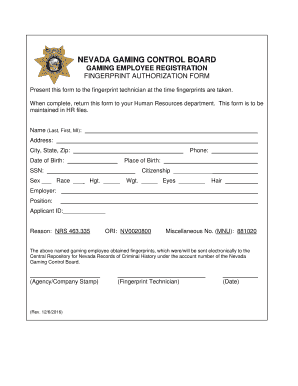
Completing the NV ENF-127 form is a crucial step for individuals seeking gaming employee registration in Nevada. This guide will walk you through the process of filling out the form online with ease and confidence.
Follow the steps to successfully complete the NV ENF-127 form.
- Click the ‘Get Form’ button to obtain the NV ENF-127 and open it in your browser.
- Begin by entering your full name in the 'Name' field. Include your last name, first name, and middle initial.
- Next, provide your address details in the 'Address' field. Ensure you include the city, state, and zip code for complete accuracy.
- In the 'Phone' field, input a valid phone number where you can be reached.
- Fill in your date of birth in the 'Date of Birth' field, ensuring the format is correct.
- Provide your place of birth in the respective field.
- Enter your Social Security Number (SSN) in the designated field.
- Select your sex and race by marking the appropriate options.
- Complete the 'Citizenship' section by stating your citizenship status.
- Input your height (Hgt.) and weight (Wgt.) in inches and pounds respectively.
- In the 'Eyes' and 'Hair' fields, specify the color of your eyes and hair.
- Fill in details about your employer and position under 'Employer' and 'Position' fields.
- Provide your Applicant ID, if available.
- State your reason for application as per NRS 463.335.
- Enter the ORI number, which is NV0020800.
- Complete the 'Miscellaneous No. (MNU)' by entering 881020.
- Ensure all required signatures and dates are filled out before submission.
- Once the form is complete, save your changes, then you can download, print, or share the form as needed.
Complete your NV ENF-127 form online today for a seamless registration process.