Loading
Get Md Pre-employment Application - Westminster 2021-2026
How it works
-

Open form follow the instructions
-

Easily sign the form with your finger
-

Send filled & signed form or save
How to use or fill out the MD Pre-Employment Application - Westminster online
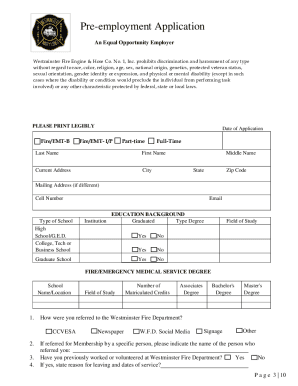
This guide provides clear and supportive instructions for completing the MD Pre-Employment Application - Westminster online. By following these steps, users can ensure that they accurately fill out the application to join the Westminster Fire Department.
Follow the steps to successfully complete the application process.
- Press the ‘Get Form’ button to access the application and open it in your browser.
- Start with filling in the date of application along with your preferred position, selecting from options such as Fire/EMT-B or Fire/EMT-I/P, as well as part-time or full-time roles.
- Provide your personal details, including your last name, first name, middle name, current address, city, state, zip code, mailing address (if different), and cell number. Ensure all information is printed clearly.
- Complete the education background section by listing institutions attended, whether you graduated, the type of degree obtained, and your field of study. Indicate any other relevant certifications or experiences.
- In the referrals section, indicate how you heard about the Westminster Fire Department. Mention if you have any relations within the organization.
- Describe your ability to perform the essential functions of the job you are applying for, including any accommodations that may be needed.
- Fill in the emergency medical technician certification, including your state EMS ID number, years of certification, level of EMT, and associated licenses.
- Outline your firefighting training certifications and experiences, providing details on any courses completed, including dates and organization names.
- List your employment history over the past five years, including references from your supervisors, responsibilities, and reasons for leaving previous positions.
- Complete the professional references section with details for three individuals who can vouch for your professional capabilities, ensuring none are relatives.
- Fill in the military service section, if applicable, providing details about your military background.
- Review all your information for accuracy. After confirming its correctness, you can save the application, download a copy for your records, or print it out to submit it by mail or electronically.
Begin completing your MD Pre-Employment Application online today!