Loading
Get Md Pre-membership Application - Westminster 2021-2026
How it works
-

Open form follow the instructions
-

Easily sign the form with your finger
-

Send filled & signed form or save
How to fill out the MD Pre-Membership Application - Westminster online
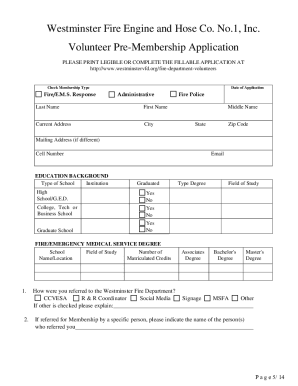
This guide provides clear instructions on completing the MD Pre-Membership Application for Westminster Fire Engine and Hose Co. No. 1, Inc. By following these steps, users can easily navigate the application form and ensure all required information is provided accurately.
Follow the steps to fill out the MD Pre-Membership Application online.
- Press the ‘Get Form’ button to access the application form and open it in your preferred document editor.
- Begin by selecting the appropriate membership type from the available options: Fire/E.M.S. Response, Administrative, or Fire Police. Make sure to check only one box.
- Provide the date of application, your full legal name, and current address. Ensure all information is accurate and legible.
- Complete the education background section. Indicate the type of school attended and field of study, marking whether you graduated.
- Fill out the emergency medical technician certification, if applicable. Provide details regarding certification levels and expiration dates.
- In the employment history section, list all employment, including volunteer work, over the past five years. Ensure to include contact information for references.
- Provide three professional references that can be contacted, avoiding family members.
- If you are 16 to 18 years old, a parental or guardian signature is required at the end of the form.
- Review all sections for completeness and accuracy before signing the application.
- Once finished, save your changes, then download or print the form for submission, ensuring you also include all required attachments like driving records or certifications.
Complete your application online today to take the next step towards joining Westminster Fire Engine and Hose Co. No. 1, Inc.