Loading
Get Mi North Ottawa Community Health System Mi-1124 2014
How it works
-

Open form follow the instructions
-

Easily sign the form with your finger
-

Send filled & signed form or save
How to fill out the MI North Ottawa Community Health System MI-1124 online
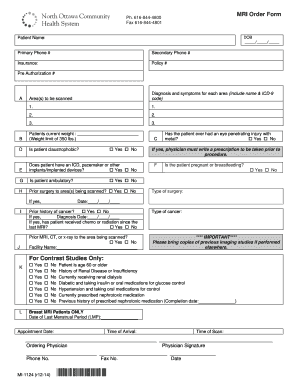
The MI North Ottawa Community Health System MI-1124 form is essential for processing MRI orders efficiently. This guide will provide clear instructions on completing the form online, ensuring that all necessary information is accurately captured.
Follow the steps to successfully complete the MI-1124 form.
- Press the ‘Get Form’ button to access the MRI Order Form and open it for editing.
- Fill in the patient's date of birth (DOB) in the required format, ensuring accuracy to avoid processing delays.
- Enter the patient's full name as it appears on identification documents.
- Provide both primary and secondary phone numbers where the patient can be reached.
- Specify the patient's insurance provider and enter the policy number along with the pre-authorization number if applicable.
- In section A, detail the area(s) to be scanned along with the diagnosis and symptoms for each area, including the corresponding ICD-9 codes when available.
- Record the patient's current weight, noting the weight limit of 350 lbs.
- Indicate if the patient is claustrophobic by selecting 'Yes' or 'No' in section D.
- In section E, clarify whether the patient has any implants such as an ICD or pacemaker, selecting the appropriate response.
- Determine if the patient is ambulatory when filling out section G.
- Section H requires you to indicate if the patient has undergone prior surgeries to the area being scanned, and if so, specify the type and date of surgery.
- Complete section C by indicating whether the patient has ever experienced an eye penetrating injury with metal and, if applicable, ensure a prescription from a physician is included.
- Confirm the patient's pregnancy status or whether they are breastfeeding in section F.
- Document any prior history of cancer in the corresponding section, noting diagnosis dates if necessary.
- Specify if the patient has had any previous MRI, CT, or x-ray to the area being scanned, along with the facility name.
- For contrast studies, answer the additional questions regarding the patient's health history, such as age, renal issues, and medications.
- If relevant, for breast MRI patients, enter the date of the last menstrual period (LMP).
- Indicate the appointment date, time of arrival, and time of the scan as required.
- Ensure the ordering physician's name, signature, phone number, and fax number are completed before submission.
- After filling out all sections, review the form for any missing information, then save changes, and download, print, or share the completed form as needed.
Complete your MI North Ottawa Community Health System MI-1124 form online today for a streamlined health service experience.
Get form
Experience a faster way to fill out and sign forms on the web. Access the most extensive library of templates available.
Related links form
Get This Form Now!
Use professional pre-built templates to fill in and sign documents online faster. Get access to thousands of forms.
Industry-leading security and compliance
US Legal Forms protects your data by complying with industry-specific security standards.
-
In businnes since 199725+ years providing professional legal documents.
-
Accredited businessGuarantees that a business meets BBB accreditation standards in the US and Canada.
-
Secured by BraintreeValidated Level 1 PCI DSS compliant payment gateway that accepts most major credit and debit card brands from across the globe.