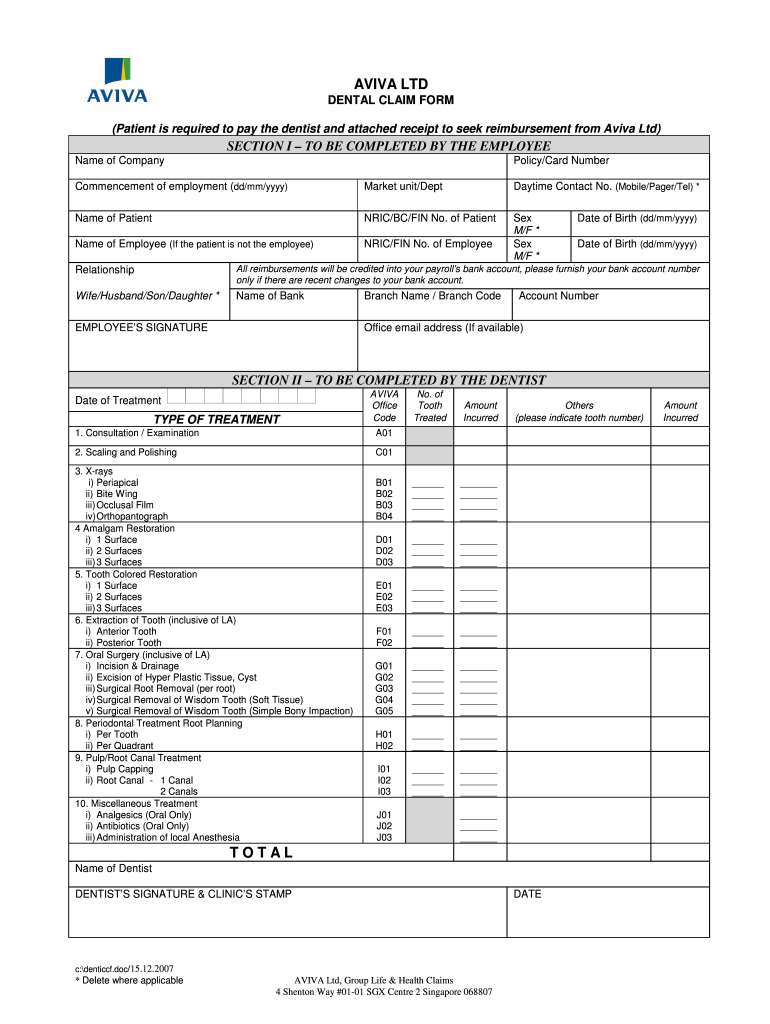
AVIVA LTD DENTAL CLAIM FORM (Patient is required to pay the dentist and attached receipt to seek reimbursement from Aviva Ltd) Name of Company SECTION I ? TO BE COMPLETED BY THE EMPLOYEE Policy/Card.
Loading

Open form follow the instructions

Easily sign the form with your finger

Send filled & signed form or save
How to fill out the Aviva Dental Claim Form online
Filling out the Aviva Dental Claim Form online is a straightforward process that allows you to seek reimbursement for dental expenses. This guide provides detailed instructions to ensure you complete the form accurately and efficiently.
Follow the steps to successfully complete your online Aviva Dental Claim Form.
- Click the ‘Get Form’ button to access the Aviva Dental Claim Form and open it in your preferred editor.
- In Section I, complete the fields required for the employee. Enter your policy or card number, commencement date of employment, market unit or department, daytime contact number, and the patient’s name along with their identification number. If the patient is not the employee, include the employee's name and identification number.
- Indicate the sex of both the employee and the patient by selecting ‘M’ for male or ‘F’ for female. Fill out the date of birth fields for both parties as well.
- Specify the relationship of the patient to the employee (e.g., spouse, child). If there have been recent changes to your bank account, provide the bank account number for reimbursement.
- Complete the bank name, branch name, and account number fields. Make sure to sign the form in the designated section to authorize the claim.
- Proceed to Section II, which needs to be completed by the dentist. This is where the dentist will record the date of treatment and specify the type of treatment provided.
- In the treatment section, the dentist will indicate the office codes, number of teeth treated, and the amount incurred for each treatment type listed. Ensure all details are accurately filled out.
- The dentist must sign the form and apply the clinic’s stamp to validate the treatment and the receipt attached.
- Once the form is completely filled out and all signatures are obtained, save the document. You can then download, print, or share the completed claim form as necessary.
Complete your Aviva Dental Claim Form online today to ensure prompt reimbursement for your dental expenses.
Experience a faster way to fill out and sign forms on the web. Access the most extensive library of templates available.
Related content
Mar 11, 2021 — This guide has important information on topics such as claims and prior...
As a global staff member or affiliate, you and your dependents may be eligible for...
Apr 5, 2021 — The severance plan also provides for three months of reimbursement of...
Get answers to your most pressing questions about US Legal Forms API.
How are dental claims submitted?
Dental claims are submitted by filling out the Aviva Dental Claim Form, which can be accessed through their website or uslegalforms, providing a convenient option. After completing the form, gather your supporting documentation, then submit your claim online or by mail. This straightforward process ensures that you can quickly receive your benefits.
How do I contact the Aviva claims line?
To contact the Aviva claims line, you can visit their official website for the most current phone number. They provide dedicated support for questions concerning the Aviva Dental Claim Form and any claim status updates. When calling, be sure to have your policy number ready for a more streamlined experience.
How do I submit a reimbursement claim?
Submitting a reimbursement claim starts with completing the Aviva Dental Claim Form. Use this form to detail your dental expenses and attach any receipts or documentation. You can submit this claim either through their online claims process or send it through traditional mail to ensure it is received by Aviva.
How do I submit an insurance claim form?
To submit an insurance claim form for your dental services, obtain the Aviva Dental Claim Form, which you can find on the Aviva website or through uslegalforms. Complete the form with clear information regarding your treatment. Finally, submit the form online or mail it to Aviva to initiate your claim.
How to make a claim for dental insurance?
Making a claim for dental insurance with Aviva involves using their Aviva Dental Claim Form. Start by gathering all relevant documentation and filling out the form accurately. You can then submit this claim through their online portal, or if you prefer, send it via mail to ensure your claim is processed efficiently.
How do I submit a claim to Aviva?
To submit a claim to Aviva, begin by completing the Aviva Dental Claim Form. You can find this form on their website or through uslegalforms, which offers easy access. After filling out the form with the necessary details, you can submit it online or mail it to the appropriate Aviva address.
How to make a claim with Aviva insurance?
Making a claim with Aviva insurance involves a few straightforward steps. First, complete the Aviva Dental Claim Form by providing all necessary information, including treatment details. Then, submit this form along with any supporting documents as directed by Aviva, ensuring that you adhere to their specific submission guidelines.
How do I claim an accident with Aviva?
To claim an accident with Aviva, begin by gathering all relevant details and documentation regarding the incident. Complete the Aviva Dental Claim Form, including information about the accident and any resulting dental treatment. Submit this form along with the required evidence to Aviva for processing your claim.
Why would a dental claim be denied?
Dental claims can be denied for various reasons, such as incorrect information, lack of coverage, or insufficient documentation. It's essential to double-check your Aviva Dental Claim Form for accuracy and completeness before submission. If a claim is denied, reviewing these factors can help you identify and address the issue effectively.
What dental claim form should be used?
The appropriate dental claim form typically depends on your specific insurance provider. For Aviva policyholders, the Aviva Dental Claim Form is the preferred choice, as it aligns with their requirements. Always ensure you are using the latest version of the form to avoid any issues during the claims process.
Use professional pre-built templates to fill in and sign documents online faster. Get access to thousands of forms.
If you believe that this page should be taken down, please follow our DMCA take down process here.