Loading
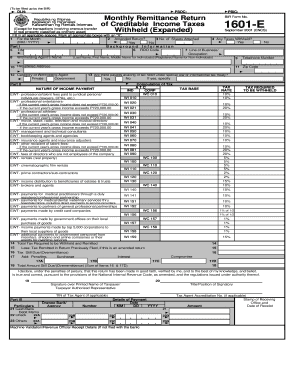
Get Ph Bir 1601-e 2001
How it works
-

Open form follow the instructions
-

Easily sign the form with your finger
-

Send filled & signed form or save
How to fill out the PH BIR 1601-E online
The PH BIR 1601-E form is essential for withholding agents to report income taxes withheld from payments. This guide provides a straightforward approach to filling out the form online, ensuring compliance and accuracy.
Follow the steps to successfully complete the PH BIR 1601-E form online.
- Click ‘Get Form’ button to access the form and launch it in your editing interface.
- Indicate the month for which the taxes are being remitted in the 'For the Month' section (MM/YYYY).
- If applicable, check the box for 'Amended Return' to indicate that this submission is a correction of a previous filing.
- Fill in the number of sheets attached as necessary to support your filing.
- In the 'Background Information' section, provide your Taxpayer Identification Number (TIN) and the relevant Revenue District Office (RDO) Code.
- Complete the line of business/occupation, along with the name of the withholding agent and their telephone number.
- Ensure to fill in your registered address and zip code for proper identification.
- Select your category of withholding agent (private or government) by marking the appropriate box.
- If there are payees availing of tax relief, check 'Yes' and provide the required details in the specified area.
- Detail the nature of income payments in 'Part II', ensuring you select the correct categories corresponding to the payments being reported.
- Calculate the tax required to be withheld, ensuring to apply the correct tax rate for the income type.
- In the 'Total Tax Required to be Withheld and Remitted' section, calculate and fill in the total amount.
- If this is an amended return, input any tax remitted in returns filed previously. This will help in determining the 'Tax Still Due' or 'Overremittance'.
- Add any penalties such as surcharges or interest to arrive at the final amount still due or overremittance.
- In the signature area, provide the printed name and signature of the taxpayer or their authorized representative along with their title or position.
- Complete the payment particulars and ensure to document details accurately, including any receipts or validations required.
- Once all fields are completed accurately, review the document for any errors, then save your changes, download, print, or share the completed form as necessary.
Complete your PH BIR 1601-E form online today to ensure timely tax compliance.
Get form
Experience a faster way to fill out and sign forms on the web. Access the most extensive library of templates available.
To file your annual income tax return online in the Philippines, you need to access the BIR’s eFPS portal and create an account. Once logged in, follow the prompts to fill out the necessary forms, including the PH BIR 1601-E if applicable. Make sure to submit before the deadline to avoid penalties.
Get This Form Now!
Use professional pre-built templates to fill in and sign documents online faster. Get access to thousands of forms.