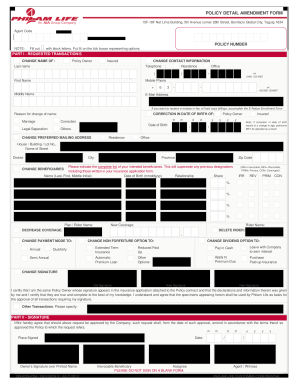
The tick boxes representing options. PART I - REQUESTED TRANSACTION/S CHANGE NAME OF : Policy Owner Insured CHANGE CONTACT INFORMATION Last name Telephone : Residence ( First Name ` - ) ex (044) 123-4567 Mobile Phone + Middle Name Office 6 3 - - ex +63-900-1234567 E-Mail Address If you want to receive e-notices in lieu of hard copy billings, accomplish the E-Notice Enrollment Form Reason for change of name: CORRECTION IN DATE OF BIRTH OF: Marriage Correction Legal Sepa.
Open form follow the instructions
Easily sign the form with your finger
Send filled & signed form or save
How to fill out the PH PHILAM LIFE QR-POS-PDA online
This guide provides users with clear, step-by-step instructions on how to complete the PH PHILAM LIFE QR-POS-PDA form online. Follow these detailed steps to ensure a smooth and successful submission.
Follow the steps to complete the PH PHILAM LIFE QR-POS-PDA form online.
- Click the ‘Get Form’ button to obtain the form and open it in the editor.
- Enter your agent code and policy number. Make sure to use block letters for clarity.
- In Part I, specify the requested transactions. You can change the name of the policy owner or insured, and update contact information including telephone and mobile phone numbers. Make sure to indicate the reason for any changes.
- If correcting the date of birth, provide the correct date and specify any marriage, legal separation, or other corrections, as applicable.
- For changes to mailing addresses, complete the new address fields, ensuring you include all required details like house number, street name, city, province and zip code.
- List intended beneficiaries including their names, dates of birth, relationships to the policy owner, and share percentages. Specify if each beneficiary is irrevocable or revocable.
- If decreasing coverage or deleting a rider, indicate the specific changes and plan names clearly.
- Complete payment mode options and non-forfeiture options as needed, selecting from available choices like annual, quarterly, or semi-annual options.
- In Part II, provide your signature over your printed name, confirming the accuracy of the information and committing to the changes. Be sure to enter the date of signing.
- Review all the fields to ensure accuracy. Once completed, users can save changes, download, print, or share the form as necessary.
Take action now and complete the PH PHILAM LIFE QR-POS-PDA form online for any necessary amendments to your policy.
Experience a faster way to fill out and sign forms on the web. Access the most extensive library of templates available.
Related content
... life end-of-month end-of-quarter end-of-season end-of-the-month end-of-week...
Get answers to your most pressing questions about US Legal Forms API.
How to change beneficiary in Philam Life?
Changing the beneficiary on your Philam Life policy is a simple process. You'll need to fill out a beneficiary change form, which you can obtain from their website or customer service. With the PH PHILAM LIFE QR-POS-PDA, you will receive guidance on how to complete this efficiently, allowing you to ensure that your benefits reflect your current wishes.
What type of insurance is Philam Life?
Philam Life offers various types of insurance, including life, health, and accident products. Their policies, like the PH PHILAM LIFE QR-POS-PDA, serve to protect both individual and family needs. Each product is tailored to address specific concerns, giving you peace of mind and security regarding your financial future.
What happened to Philam Life insurance Philippines?
Philam Life has continuously evolved to meet the changing needs of its clients, maintaining strong service and reliable products. Its transition towards digital solutions, including the PH PHILAM LIFE QR-POS-PDA, demonstrates how the company embraces modern technology. By adapting to industry trends, Philam Life stays competitive and relevant in the growing insurance landscape in the Philippines.
How do I claim my Philam Life insurance policy in the Philippines?
You can easily claim your Philam Life insurance policy by following a few straightforward steps. First, gather necessary documents such as your policy number and identification. Next, reach out to Philam Life's customer service or visit their website, where the PH PHILAM LIFE QR-POS-PDA provides clear instructions and assistance throughout the claims process.
Is Philam Life a life insurance?
Yes, Philam Life is primarily known for its life insurance products that provide financial protection during unexpected situations. The PH PHILAM LIFE QR-POS-PDA is a key offering, ensuring that you can safeguard your loved ones' financial well-being. By choosing Philam Life, you invest in a reliable solution that supports your long-term financial planning.
What is the top 1 insurance in the Philippines?
The top insurance company in the Philippines often includes Philam Life, noted for its solid reputation and comprehensive coverage options. With products like the PH PHILAM LIFE QR-POS-PDA, Philam Life continues to lead the market. This insurance provider offers a blend of protection and savings, ensuring that policyholders meet their financial goals while securing their family’s future.
Can I withdraw fund value in?
You can withdraw fund value from your policies with Philam Life by accessing the withdrawal options available through the PH PHILAM LIFE QR-POS-PDA. Ensure that you meet any necessary requirements or waiting periods set by your policy. If you're unsure, our platform can help clarify your options.
Can I withdraw my investment?
Yes, you can withdraw your investment from Philam Life, including those linked to the PH PHILAM LIFE QR-POS-PDA. Just keep in mind that the withdrawal process may vary based on your specific policy terms. Always check your policy details or consult a representative for personalized advice.
What is the name of Philam Life?
Philam Life is officially known as Philippine American Life and General Insurance Company. It offers a range of life insurance, investment, and protection products, including services related to the PH PHILAM LIFE QR-POS-PDA. By being informed about Philam Life's offerings, you can make smarter financial decisions.
How to withdraw BPI funds?
To withdraw BPI funds through the PH PHILAM LIFE QR-POS-PDA, simply access your online banking account and select the option to transfer funds. Choose the account from which you want to withdraw and follow the prompts to complete the transaction. If you need assistance, consider reaching out to customer service or using our platform for guidance.
Use professional pre-built templates to fill in and sign documents online faster. Get access to thousands of forms.
If you believe that this page should be taken down, please follow our DMCA take down process here.