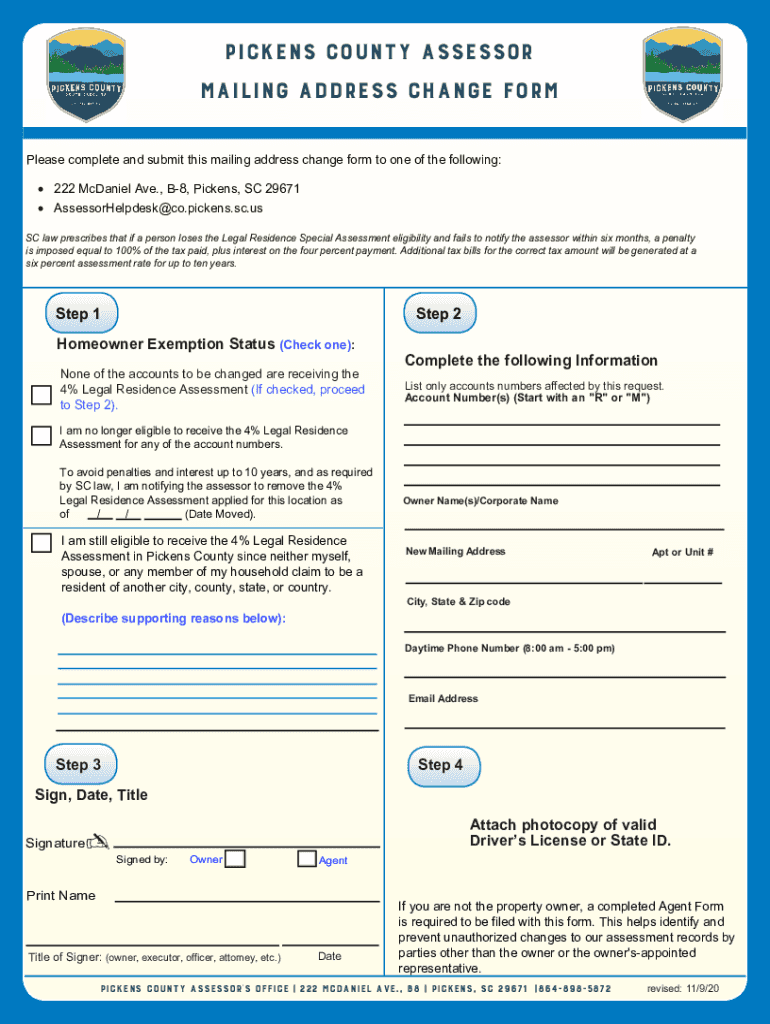
Pickens County ASSESSOR mailing address change form Please complete and submit this mailing address change form to one of the following: 222 McDaniel Ave., B8, Pickens, SC 29671 AssessorHelpdesk co.Pickens.SC.us.

Open form follow the instructions

Easily sign the form with your finger

Send filled & signed form or save
How to fill out the SC Mailing Address Change Form - Pickens County online
This guide provides clear and concise instructions on how to complete the SC Mailing Address Change Form for Pickens County online. Follow the steps below to ensure a smooth process and avoid any potential penalties associated with address changes.
Follow the steps to fill out the SC Mailing Address Change Form correctly.
- Press the ‘Get Form’ button to access the mailing address change form and open it in the editor.
- Indicate your homeowner exemption status by checking the appropriate box. If none of the accounts to be changed are receiving the 4% Legal Residence Assessment, proceed to the next step.
- Complete the following information by listing only the account numbers that are affected by this request. Ensure you start each account number with an 'R' or 'M' as required.
- If you are no longer eligible for the 4% Legal Residence Assessment, check the relevant box and provide the date you moved out. This is important to avoid penalties as per SC law.
- If you are still eligible for the assessment, check the appropriate box and provide supporting reasons in the space provided.
- Fill in your full name, the new mailing address, including any apartment or unit number, and the city, state, and zip code.
- Provide your daytime phone number and email address for any necessary communication.
- Sign and date the form, including your title if applicable. Make sure to attach a photocopy of your valid Driver’s License or State ID.
- If you are not the property owner, complete an Agent Form to authorize a representative. This prevents unauthorized changes.
- Once all sections are filled out correctly, save your changes. You may download, print, or share the form as needed.
Complete your SC Mailing Address Change Form online today to ensure your address is accurately reflected in county records.
Experience a faster way to fill out and sign forms on the web. Access the most extensive library of templates available.
Related content
Office Hours: 8:30 AM - 5:00 PM. Address: Pickens County DSS 212 McDaniel Ave. Pickens, SC...
May 27, 2022 — Certificate of Proof of Chain of Physical Custody or Control (Subsequent...
Providers must notify Molina in writing (some changes can be made online) at least thirty...
Get answers to your most pressing questions about US Legal Forms API.
What are property taxes in Pickens County SC?
FAQ Primary Residences4%Other Real Estate6%Personal Property(Watercraft, Aircraft, Campers, Business Personal Property)6% - 10.5% (See County Auditor for details on the 6% rate on Watercraft and Campers)Commercial boats10.5%Primary-residence Boats4%6 more rows
What is the vehicle property tax in Pickens SC?
Privately owned passenger vehicles are assessed at a ratio of 6.00% of its market value. All medium and Heavy Duty trucks and businesses are assessed at a ratio of 10.5% of its market value.
What are rollback taxes in Greenville County SC?
Rollback taxes are calculated on the difference between what was paid under agricultural use verses what would have been paid as non- agricultural property. The rollback taxes can be applied to the property for the preceding three (3) years.
What are rollback taxes Pickens County?
Rollback taxes are equal to the difference, if any, between the taxes paid or payable on the basis of the valuation and the assessment as agricultural property and the taxes that would have been paid or payable had the real property been valued, assessed and taxed as other real property in the taxing district.
What are rollback taxes in South Carolina?
Rollback Taxes The Rollback tax is a requirement codified in South Carolina state law. Anytime a property changes its use from agricultural use to any other use, it causes rollback taxes to be assessed and billed to that portion of the property.
What is the homestead exemption in Pickens County SC?
The Homestead Exemption is a complete exemption of taxes on the first $50,000 in Fair Market Value of your Legal Residence for homeowners over age 65, totally and permanently disabled, or legally blind.
What is an example of a rollback tax?
Examples of Rollback Taxes For example, this could happen if the owner requests a zoning change to convert the property from agricultural to residential use or subdivides a piece of agricultural land for residential development.
Use professional pre-built templates to fill in and sign documents online faster. Get access to thousands of forms.
If you believe that this page should be taken down, please follow our DMCA take down process here.