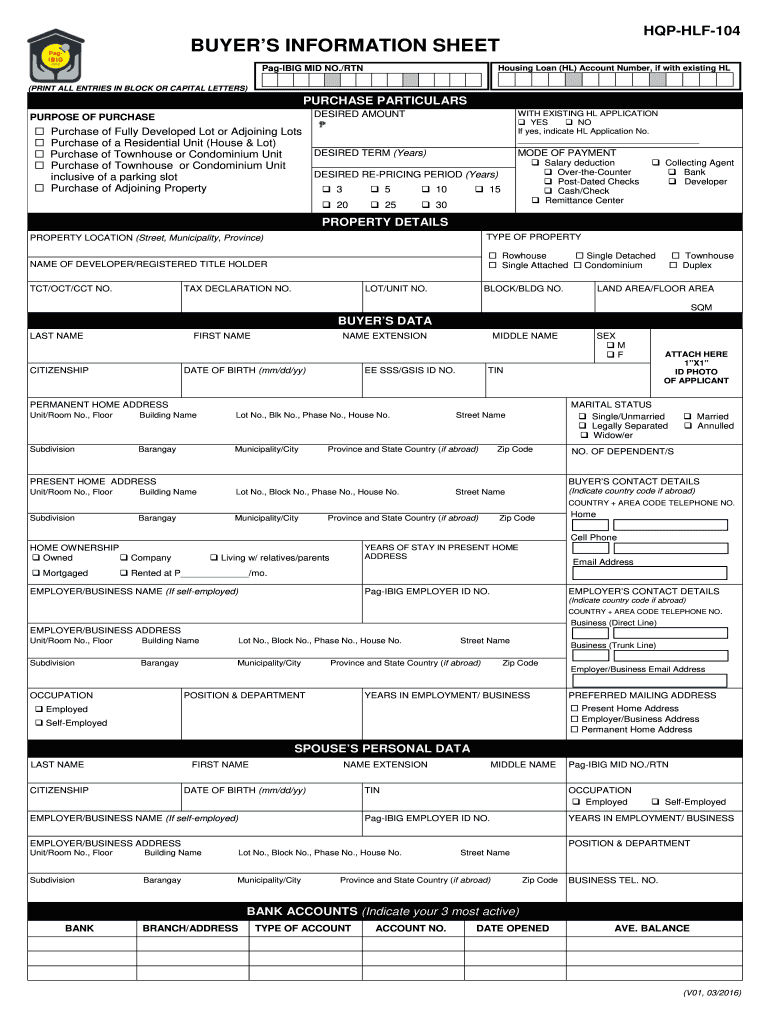
ESS EMPLOYER/BUSINESS ADDRESS POSITION & DEPARTMENT Unit/Room No., Floor Building Name Lot No., Block No., Phase No., House No. Subdivision Barangay Municipality/City Street Name Province and State Country (if abroad) Zip Code BUSINESS TEL. NO. BANK ACCOUNTS (Indicate your 3 most active) BANK BRANCH/ADDRESS TYPE OF ACCOUNT ACCOUNT NO. DATE OPENED AVE. BALANCE (V01, 03/2016) CREDIT CARDS OWNED (Indicate your 3 most active) CARD TYPE (e.g. Visa/Mastercard) ISSUER NAME CARD E.
Loading

Open form follow the instructions

Easily sign the form with your finger

Send filled & signed form or save
How to fill out the PH Pag-IBIG HQP-HLF-104 online
The PH Pag-IBIG HQP-HLF-104 form is essential for individuals seeking to apply for a housing loan through the Pag-IBIG Fund. This guide will provide a step-by-step approach to completing this form online, ensuring that you submit accurate and complete information.
Follow the steps to fill out the form effectively.
- Press the ‘Get Form’ button to acquire the form and open it in your editor.
- Begin with the buyer’s information sheet. Enter your Pag-IBIG MID number and, if applicable, the housing loan account number. Ensure all details are printed in capital letters.
- In the purchase particulars section, specify the desired amount you wish to borrow. Choose the purpose of your purchase from the provided options.
- Indicate whether you have an existing housing loan application by selecting 'Yes' or 'No.' If 'Yes,' provide the housing loan application number.
- Fill in the desired term in years for the loan, followed by your preferred mode of payment.
- Select your desired re-pricing period from the available options.
- Move on to the property details section, where you will enter the property location and type of property.
- Complete the sections pertaining to the buyer's data, ensuring to fill in your last name, first name, citizenship, and other relevant details. Include your contact information.
- Provide information about your employer or business, including their name, contact details, and your position.
- If applicable, fill out the spouse’s personal data section in the same manner, including necessary details.
- Document your bank accounts, credit cards, and real estate owned by providing descriptions and relevant details.
- Address any miscellaneous questions accurately, elaborating where necessary.
- Fill in loan and credit references, as well as trade references if you are self-employed.
- Complete the source of Pag-IBIG Fund housing information section by selecting how you learned about Pag-IBIG.
- Finally, review the certification section, sign and date the form. Ensure that all information is complete before saving changes, downloading, or printing your form.
Start submitting your forms online today to streamline your housing loan application process.
Experience a faster way to fill out and sign forms on the web. Access the most extensive library of templates available.
Related content
Get answers to your most pressing questions about US Legal Forms API.
How much is the loanable amount in Pag-IBIG housing?
The loanable amount in Pag-IBIG housing depends on several factors, such as your income and payment capacity. Generally, the Pag-IBIG Fund allows members to borrow up to a maximum of PHP 6 million under the PH Pag-IBIG HQP-HLF-104 program. This flexibility accommodates various financial situations, making it accessible for more individuals. To explore the exact amount you can borrow, you may consider consulting uslegalforms to assist you with the necessary documentation and processes.
What is the mode of payment for Pag-IBIG?
Pag-IBIG offers several convenient modes of payment, including bank deposits, online transfer, and contributions through accredited payment centers. Members can choose the method that suits their lifestyle, ensuring they stay current with contributions. To explore various payment options, refer to the PH Pag-IBIG HQP-HLF-104, which outlines each method clearly.
How to fill up waiver of rights Pag-IBIG?
Filling up the waiver of rights for Pag-IBIG requires careful attention to detail. Start by obtaining the form from the Pag-IBIG website or your local office, then provide your personal information and specify the rights you wish to waive. If you need assistance, consider utilizing the resources available through the PH Pag-IBIG HQP-HLF-104 to ensure you complete the process accurately.
What is the Pag-IBIG plan of payment?
The Pag-IBIG plan of payment allows members to contribute on a monthly basis easily. Members can choose from various payment options that fit their income and needs, such as direct employer deductions or voluntary contributions. For more comprehensive details on these plans, the PH Pag-IBIG HQP-HLF-104 can serve as a helpful reference.
How much is the monthly payment of Pag-IBIG?
The monthly payment to Pag-IBIG varies based on your salary bracket and chosen contribution rate. Typically, it ranges from a minimum of 100 PHP to a higher amount, depending on your financial standing. To understand the best payment structure for you, look into the PH Pag-IBIG HQP-HLF-104, as it provides detailed information and examples.
What happens if I stop paying Pag-IBIG contributions?
If you stop paying your Pag-IBIG contributions, you may lose benefits, such as access to housing loans or dividend earnings. Additionally, unpaid contributions may lead to penalties or the automatic cancellation of your membership. If you are facing difficulties with payments, consider exploring solutions like the PH Pag-IBIG HQP-HLF-104 program, which offers guidance on maintaining your contributions.
How to fill up PAG-IBIG membership form online?
To fill out the PAG-IBIG membership form online, first, visit the official PAG-IBIG website and navigate to the online services section. You will find the PH Pag-IBIG HQP-HLF-104 form available for download. Complete the form by entering your personal details accurately, ensuring all required fields are filled. Finally, submit the form electronically as per the instructions provided, and keep a copy for your records.
How to know Pag-IBIG loanable amount?
To determine your loanable amount with Pag-IBIG, you can use the online calculator available on their website. Input your total contributions and other relevant data to get an estimate. Alternatively, you can contact their customer service for detailed information specific to the PH Pag-IBIG HQP-HLF-104 benefits. Understanding your loanable amount helps you prepare effectively for your financial needs.
Is there a condonation program for Pag-IBIG loan?
Secure and accomplish the Application for New Penalty Condonation Program on Mandatory Monthly Savings (MS) Remittances (HQP-PFF-397) from the Pag-IBIG Branch. The application form may be downloaded from the Pag-IBIG Fund website at .pagibigfund.gov.ph.
How can I check my Pag-IBIG loan details?
Loan Status Verification. Virtual Pag-IBIG. For questions or to follow-up on your loan application, please call (02)8724-4244 or chat us by clicking on the icon found at the bottom right of your screen.
Use professional pre-built templates to fill in and sign documents online faster. Get access to thousands of forms.
If you believe that this page should be taken down, please follow our DMCA take down process here.