Loading
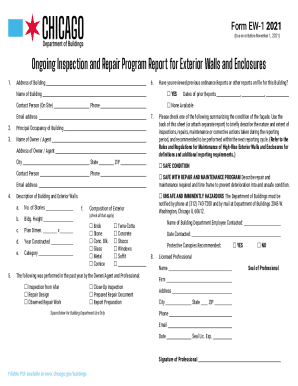
Get Il Form Ew-1 - City Of Chicago 2021-2025
How it works
-

Open form follow the instructions
-

Easily sign the form with your finger
-

Send filled & signed form or save
How to fill out the IL Form EW-1 - City Of Chicago online
The IL Form EW-1 is designed for reporting on the ongoing inspection and repair of exterior walls and enclosures for buildings in Chicago. This guide will help you navigate the online process of completing the form efficiently and accurately.
Follow the steps to fill out the form online.
- Click ‘Get Form’ button to obtain the form and open it in the editor.
- Begin by providing the address of the building. Ensure you enter the complete and accurate address, as this will be essential for tracking and administrative purposes.
- In the section labeled 'Name of Building,' input the official name of the building located at the address provided in step 2.
- Identify yourself as the 'Owner/Agent' of the building by entering your name in the relevant field, followed by the address, city, state, and ZIP code. A contact person and phone number are also required.
- Fill out the details regarding the building's characteristics, including the number of stories, building height, plan dimensions, year constructed, and category.
- Indicate whether the building is considered 'Unsafe and Imminently Hazardous' by checking the appropriate box. If so, you must notify the Department of Buildings as indicated.
- In the 'Composition of Exterior' section, check all materials that apply to the building's exterior, such as brick, concrete, glass, etc.
- Report on the inspections and repairs performed in the past year by checking the relevant boxes that reflect the activities completed by the Owner/Agent and Professional.
- Summarize the condition of the façade by selecting one of the options provided, utilizing the back of the sheet or an attached report to describe further the inspections, repairs, and recommendations.
- Provide the 'Name of Building Department Employee Contacted' and the 'Date Contacted.' Include any recommendations for protective canopies if applicable.
- Complete the section for the licensed professional, which requires their name, seal, address, phone number, email, and signature.
- Once you have completed all required fields, review your entries for accuracy. You can save your changes, download the form, print it, or share it as needed.
Start completing your documents online today!
How It Works. Before your visit, download an application form, then submit the application at one of our offices, plus any additional documentation (must have PIN #). Some permits can be obtained online – apply for an Easy Permit, pay for it and print it out.
Industry-leading security and compliance
US Legal Forms protects your data by complying with industry-specific security standards.
-
In businnes since 199725+ years providing professional legal documents.
-
Accredited businessGuarantees that a business meets BBB accreditation standards in the US and Canada.
-
Secured by BraintreeValidated Level 1 PCI DSS compliant payment gateway that accepts most major credit and debit card brands from across the globe.