Loading
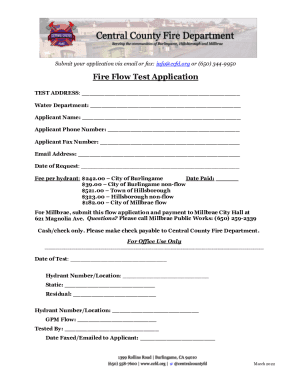
Get Ca Fire Flow Test Application - Central County 2022-2026
How it works
-

Open form follow the instructions
-

Easily sign the form with your finger
-

Send filled & signed form or save
How to fill out the CA Fire Flow Test Application - Central County online
This guide provides clear instructions on how to effectively complete the CA Fire Flow Test Application for Central County online. By following these steps, you will ensure that your application is accurately submitted and all necessary information is included.
Follow the steps to complete the CA Fire Flow Test Application online
- Press the ‘Get Form’ button to retrieve the form and open it in your preferred document editor.
- Begin by entering the test address in the designated field. Ensure the address is complete and accurate to facilitate the testing process.
- In the Water Department section, include the name of the relevant water department associated with your address.
- Input your name as the applicant in the Applicant Name field.
- Provide your phone number in the Applicant Phone Number field to ensure contact information is readily available.
- If applicable, add your fax number in the Applicant Fax Number field.
- Enter your email address in the Email Address field for electronic communication regarding your application.
- Fill out the Date of Request field with the current date.
- Select the fee applicable for your hydrant from the list provided and note it in the Date Paid section when payment is made. Fees vary depending on the municipality.
- For applicants in Millbrae, ensure you note the instruction to submit the flow application and payment to Millbrae City Hall.
- Once all fields are filled, save any changes you have made to the form.
- You can then choose to download, print, or share the form as needed, ensuring it is submitted via email or fax to the provided contact information.
Complete your CA Fire Flow Test Application online today to ensure efficient processing.