We use cookies to improve security, personalize the user experience, enhance our marketing activities (including cooperating with our marketing partners) and for other business use.
Click "here" to read our Cookie Policy. By clicking "Accept" you agree to the use of cookies. Read less
Read more
Accept
Loading
Form preview
  • US Legal Forms
  • Form Library
  • More Forms
  • More Multi-State Forms
  • Ca Fictitious Business Name Statement - San Francisco County 2022

Get Ca Fictitious Business Name Statement - San Francisco County 2022-2025

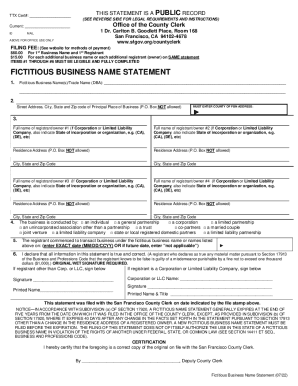
TTX Cert#: THIS STATEMENT IS A PUBLIC RECORD (SEE REVERSE SIDE FOR LEGAL REQUIREMENTS AND INSTRUCTIONS)Office of the County Overcurrent: ID1 Dr. Carlton B. Goodliest Place, Room 168 San Francisco,.

How it works

  1. Open form

    Open form follow the instructions

  2. Easily sign form

    Easily sign the form with your finger

  3. Share form

    Send filled & signed form or save

How to fill out the CA Fictitious Business Name Statement - San Francisco County online

The CA Fictitious Business Name Statement is an important document for businesses operating under a name that is not their legal name. This guide provides step-by-step instructions to help you complete this form accurately and efficiently online.

Follow the steps to complete your fictitious business name statement online.

  1. Click ‘Get Form’ button to obtain the form and open it in the editor.
  2. Enter the fictitious business name(s) or trade name(s) you plan to use. Only names operating from the same address can be listed together. If applicable, use small numbers (#1, #2, etc.) next to each name for proper indexing.
  3. Provide the street address, city, state, and zip code of your principal place of business. Note that P.O. Box addresses are not permitted.
  4. Fill in the names and addresses of the registrants or owners. If you are filing as an individual, partnership, corporation, or limited liability company, ensure that the corresponding details are filled out correctly. P.O. Box addresses are again not acceptable.
  5. Indicate how the business is conducted by checking the appropriate box that describes your business structure.
  6. Provide the exact date that you commenced business under the fictitious name. If you have not yet begun using the name, indicate 'not applicable.'
  7. Sign the form where indicated. An original or wet signature is required. Different signatures are needed based on the type of registrant: individual, partnership, corporation, etc.
  8. Review all entries to ensure the information is legible and complete. Remember that all items in sections #1 through #6 must be fully completed.
  9. Once all information is finalized, save your changes, download a copy of the form, and consider printing it for your records before submitting it as required.

Complete your CA Fictitious Business Name Statement online now!

Get form

Experience a faster way to fill out and sign forms on the web. Access the most extensive library of templates available.
Get form

Related content

Fictitious Business Name (FBN) Filing Instructions
Search online - Fictitious Business Name Search: FBN Search · Search via a terminal at...
Learn more
Fictitious Business Names
NOTE. This pamphlet begins on page 601. The Commission's annual reports and its...
Learn more
Instructions for Electronic Submission of Form FDA...
This document provides detailed instructions on how to: • Register a new Food Canning...
Learn more

Related links form

About This Form Car Gift Letter Family Member Maine Maine 1120me For 2002 Form Form 941bn Me

Questions & Answers

Get answers to your most pressing questions about US Legal Forms API.

Contact support

An individual or a business entity must file a fictitious business name (FBN) statement with the Registrar-Recorder/County Clerk's office in the county where the business will be located when the name of the business does not include the owner's last name.

In the case of a business owned by an individual, a “fictitious business name” is any name that does not include the last name (surname) of the owner, or which implies additional owners (such as "Company", "and Company", "and Sons", "Associates", etc.).

You must re-file every 5 years, paying the current fees, even if there are no changes. You are not required to republish a renewal if the information remains the same. You do not need a third party to file a new or a renewed FBN statement for you.

To receive a copy of a Fictitious Business Name Statement over the phone, please contact (800) 201-8999, and provide: FBN Statement information.

You must register your business with the S.F. Tax Collector located at City Hall, Room 140, (415) 554-4400, .sfgov.org/tax prior to submitting FBN statement. 3. If filing in person, person must present valid legal photo identification (CA B&P Code Sec.

After your statement has been filed, publishing is required under the following circumstances (Business and Professions Code 17917): A new Fictitious Business Name Statement filing. A renewal or re-filing of Fictitious Business Name Statement with changes.

An individual or a business entity must file a fictitious business name (FBN) statement with the Registrar-Recorder/County Clerk's office in the county where the business will be located when the name of the business does not include the owner's last name.

Under California law, sole proprietors, partnerships, limited liability companies and corporations must file a DBA if they plan to operate under a different name.

Get This Form Now!

Use professional pre-built templates to fill in and sign documents online faster. Get access to thousands of forms.
Get form
If you believe that this page should be taken down, please follow our DMCA take down processhere.

Industry-leading security and compliance

US Legal Forms protects your data by complying with industry-specific security standards.
  • In businnes since 1997
    25+ years providing professional legal documents.
  • Accredited business
    Guarantees that a business meets BBB accreditation standards in the US and Canada.
  • Secured by Braintree
    Validated Level 1 PCI DSS compliant payment gateway that accepts most major credit and debit card brands from across the globe.
Get CA Fictitious Business Name Statement - San Francisco County
Get form
Form Packages
Adoption
Bankruptcy
Contractors
Divorce
Home Sales
Employment
Identity Theft
Incorporation
Landlord Tenant
Living Trust
Name Change
Personal Planning
Small Business
Wills & Estates
Packages A-Z
Form Categories
Affidavits
Bankruptcy
Bill of Sale
Corporate - LLC
Divorce
Employment
Identity Theft
Internet Technology
Landlord Tenant
Living Wills
Name Change
Power of Attorney
Real Estate
Small Estates
Wills
All Forms
Forms A-Z
Form Library
Customer Service
Terms of Service
Privacy Notice
Legal Hub
Content Takedown Policy
Bug Bounty Program
About Us
Help Portal
Legal Resources
Blog
Affiliates
Contact Us
Delete My Account
Site Map
Industries
Forms in Spanish
Localized Forms
State-specific Forms
Forms Kit
Legal Guides
Real Estate Handbook
All Guides
Prepared for You
Notarize
Incorporation services
Our Customers
For Consumers
For Small Business
For Attorneys
Our Sites
US Legal Forms
USLegal
FormsPass
pdfFiller
signNow
airSlate WorkFlow
DocHub
Instapage
Social Media
Call us now toll free:
+1 833 426 79 33
As seen in:
  • USA Today logo picture
  • CBC News logo picture
  • LA Times logo picture
  • The Washington Post logo picture
  • AP logo picture
  • Forbes logo picture
© Copyright 1997-2025
airSlate Legal Forms, Inc.
3720 Flowood Dr, Flowood, Mississippi 39232
Form Packages
Adoption
Bankruptcy
Contractors
Divorce
Home Sales
Employment
Identity Theft
Incorporation
Landlord Tenant
Living Trust
Name Change
Personal Planning
Small Business
Wills & Estates
Packages A-Z
Form Categories
Affidavits
Bankruptcy
Bill of Sale
Corporate - LLC
Divorce
Employment
Identity Theft
Internet Technology
Landlord Tenant
Living Wills
Name Change
Power of Attorney
Real Estate
Small Estates
Wills
All Forms
Forms A-Z
Form Library
Customer Service
Terms of Service
Privacy Notice
Legal Hub
Content Takedown Policy
Bug Bounty Program
About Us
Help Portal
Legal Resources
Blog
Affiliates
Contact Us
Delete My Account
Site Map
Industries
Forms in Spanish
Localized Forms
State-specific Forms
Forms Kit
Legal Guides
Real Estate Handbook
All Guides
Prepared for You
Notarize
Incorporation services
Our Customers
For Consumers
For Small Business
For Attorneys
Our Sites
US Legal Forms
USLegal
FormsPass
pdfFiller
signNow
airSlate WorkFlow
DocHub
Instapage
Social Media
Call us now toll free:
+1 833 426 79 33
As seen in:
  • USA Today logo picture
  • CBC News logo picture
  • LA Times logo picture
  • The Washington Post logo picture
  • AP logo picture
  • Forbes logo picture
© Copyright 1997-2025
airSlate Legal Forms, Inc.
3720 Flowood Dr, Flowood, Mississippi 39232