Loading
Get Ca Report Of Use Fee - City Of Avalon 2020-2025
How it works
-

Open form follow the instructions
-

Easily sign the form with your finger
-

Send filled & signed form or save
How to fill out the CA Report Of Use Fee - City Of Avalon online
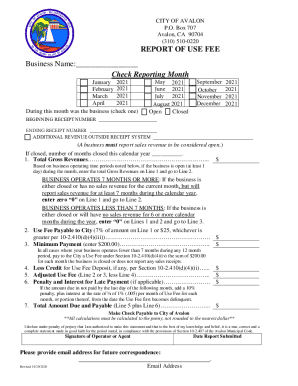
Filling out the CA Report Of Use Fee form online can streamline your reporting process and ensure compliance with local regulations. This guide provides detailed steps to help you complete the form accurately and efficiently.
Follow the steps to complete your form with ease.
- Click ‘Get Form’ button to obtain the form and open it in the editor.
- Enter your business name in the designated space. This should be the official name under which your business operates.
- Check the reporting month by selecting one of the options provided. This indicates the month for which you are reporting your use fee.
- Indicate whether your business was open or closed during the selected month by checking the appropriate box.
- Fill in the beginning receipt number. This is the starting number of your sales receipts for the specified reporting period.
- Input the ending receipt number to denote the conclusion of your sales receipts for the month.
- Report any additional revenue outside the receipt system, if applicable. Be sure to include all relevant amounts for accuracy.
- Complete Line 1 by entering your total gross revenues. If your business operated at least one day in the month, enter the corresponding amount.
- Proceed to Line 2 to calculate the use fee payable. This is either 7% of the amount from Line 1 or a minimum of $25, depending on the higher value.
- For businesses operating fewer than 7 months, enter $200 on Line 3 as the minimum payment due.
- If applicable, deduct any credit for use fee deposit on Line 4 from your total. This adjusts the use fee you owe.
- Calculate the adjusted use fee on Line 5 by subtracting Line 4 from Line 2 or Line 3.
- Determine any penalties or interest due on Line 6 if your payment is late. This adds a 10% penalty plus interest for each month overdue.
- Sum the total amount due on Line 7 by adding Line 5 and Line 6 to find the total payable amount.
- Sign the form in the designated area to declare that the information provided is accurate and true to the best of your knowledge.
- Finally, provide your email address for future correspondence and any necessary follow-up.
Begin your form submission process now and ensure your business remains compliant by completing the necessary documents online.
Industry-leading security and compliance
US Legal Forms protects your data by complying with industry-specific security standards.
-
In businnes since 199725+ years providing professional legal documents.
-
Accredited businessGuarantees that a business meets BBB accreditation standards in the US and Canada.
-
Secured by BraintreeValidated Level 1 PCI DSS compliant payment gateway that accepts most major credit and debit card brands from across the globe.