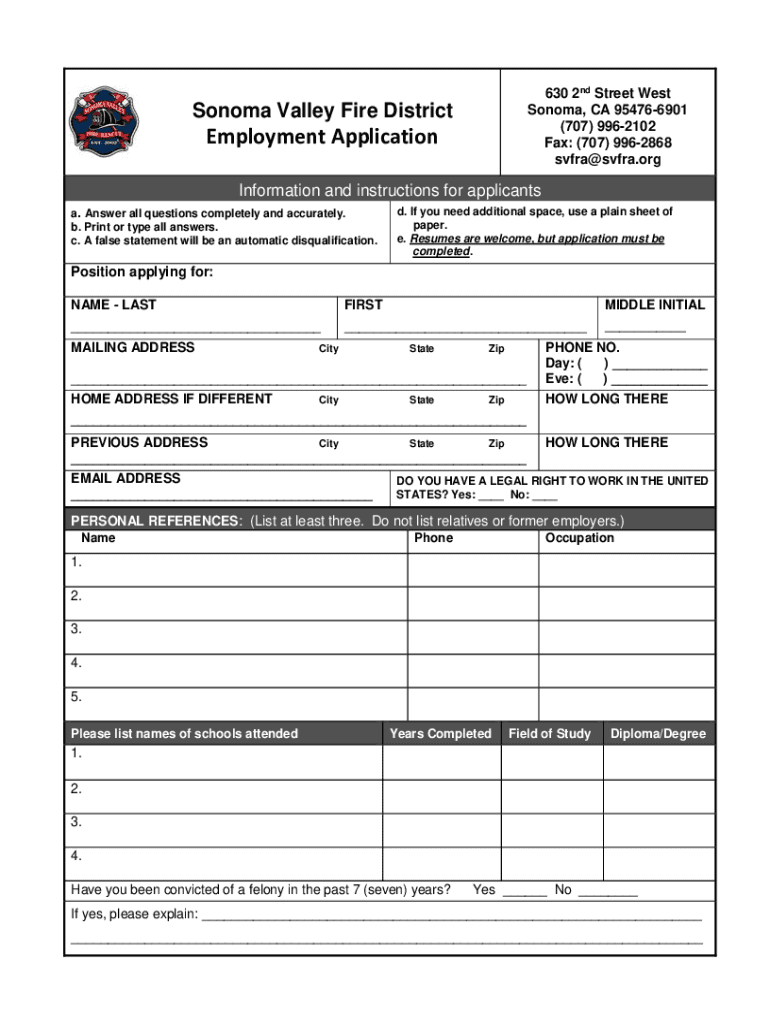
630 2nd Street West Sonoma, CA 954766901 (707) 9962102 Fax: (707) 9962868 svfra svfra.orgSonoma Valley Fire DistrictEmployment ApplicationInformation and instructions for applicants a. Answer all.
Loading

Open form follow the instructions

Easily sign the form with your finger

Send filled & signed form or save
How to fill out the CA Employment Application - Sonoma Valley online
The CA Employment Application for Sonoma Valley is an essential document for job seekers looking to apply within the district. This guide provides detailed, step-by-step instructions on how to complete the application online, ensuring a seamless submission process.
Follow the steps to accurately complete your application.
- Click ‘Get Form’ button to obtain the application and open it in the editor.
- Begin by filling in your personal information in the designated fields. Include your last name, first name, and middle initial. Then, provide your mailing address, home address (if different), and contact numbers for daytime and evening reach.
- Indicate your legal right to work in the United States by selecting either 'Yes' or 'No'.
- List at least three personal references who are not relatives or former employers, along with their phone numbers and occupations.
- Provide details of your educational background by listing schools attended, years completed, field of study, and any diplomas or degrees received.
- If applicable, respond to the question regarding felony convictions in the past seven years by selecting 'Yes' or 'No'. If 'Yes', provide an explanation in the space given.
- List any licenses or professional certificates you hold in the designated space.
- Begin detailing your employment history. For each previous position, provide the dates of employment, position title, name and address of the employer, supervisor's name and phone number, number of employees supervised, reason for leaving, job duties description, and monthly salary.
- You will also be asked whether the district can contact your current and past employers for references. Select 'Yes' or 'No'.
- Indicate how you learned about the job opportunity by filling in the relevant information.
- Before submitting, review all the information provided for accuracy. Confirm that all statements are true and complete. Finally, sign and date the application.
- After completing the application, you can save changes, download, print, or share the form as needed.
Get started on your application online today and take the next step in your career!
Experience a faster way to fill out and sign forms on the web. Access the most extensive library of templates available.
Related content
Application. Each applicant is responsible for submitting an official Sonoma County...
Many Opportunities. The State of California offers a wide variety of careers and jobs...
The tribe now has around 275 enrolled members. It has a casino in San Pablo, California...
Get answers to your most pressing questions about US Legal Forms API.
What is considered Sonoma County?
Sonoma County comprises the Santa Rosa-Petaluma Metropolitan Statistical Area, which is part of the San Jose-San Francisco-Oakland, CA Combined Statistical Area. It is the northernmost county in the nine-county San Francisco Bay Area region.
What is the most diverse city in Sonoma County?
Roseland. #1 Most Diverse Places to Live in Sonoma County.
How do I become a California state employee?
How to Get a State Job Search for Jobs on the CalCareers Website. Create a CalCareers account. ... Pass an Exam. The Employment Development Department (EDD) is part of the merit-based California civil service selection system. ... Apply for Job Openings. Apply for the job. ... Prepare for the Interview. ... Pass Your Probation Period.
How many cities are in Sonoma County?
Geographic Distribution of Population Sonoma County residents inhabit nine cities and a large unincorporated area, including many geographically isolated communities. The majority of the county's population resides within its cities, the largest of which are clustered along the Highway 101 corridor.
What cities make up Sonoma County?
Local Government City of Cloverdale. Tucked into the hills of Sonoma County is a place still untouched by the hustle and bustle of its San Francisco Bay Area neighbors. . ... City of Cotati. ... City of Healdsburg. ... City of Petaluma. ... City of Rohnert Park. ... City of Santa Rosa. ... City of Sebastopol. ... City of Sonoma.
What is the wealthiest city in Sonoma County?
The wealthiest city or community in Sonoma County is Eldridge.
How do I get a job?
How to get your first job Set your expectations. Network with peers. Consider a job for the experience. Write a resume. Search for a job. Prepare for the interview. Dress appropriately. Follow up after the interview.
How do I apply for Sonomaworks?
Drop-in at one of our offices to set an appointment Monday- Friday, 9 a.m.-4:30 p.m. Santa Rosa: 2227 Capricorn Way, Suite 100, Santa Rosa, CA 95407. Petaluma: Human Services South County Center, 5350 Old Redwood Highway, North, Suite 100, Petaluma, CA 94954.
Use professional pre-built templates to fill in and sign documents online faster. Get access to thousands of forms.
If you believe that this page should be taken down, please follow our DMCA take down process here.