Loading
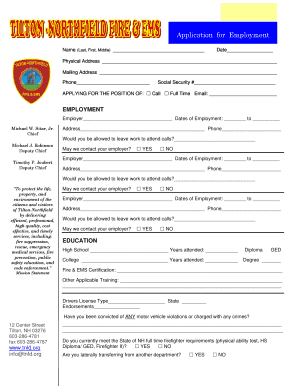
Get Nh Application For Employment - Tilton-northfield 2016-2026
How it works
-

Open form follow the instructions
-

Easily sign the form with your finger
-

Send filled & signed form or save
How to fill out the NH Application For Employment - Tilton-Northfield online
Completing the NH Application For Employment - Tilton-Northfield online can be a straightforward process if you follow the right steps. This guide will walk you through each section of the application, ensuring that you provide all necessary information accurately and clearly.
Follow the steps to complete your application effectively.
- Click ‘Get Form’ button to access the application and open it in your editor.
- Begin with the applicant's name section. Enter your last name, first name, and middle name in the designated fields.
- In the social security number section, provide your social security number.
- Answer whether you can leave work for calls and whether you permit the organization to contact your employer.
- In the education section, list your high school and college information, including the years attended. Specify if you obtained a diploma, GED, or degree.
- Provide your driver's license type and state. Indicate any motor vehicle violations or charges you have faced.
- List your references by providing their names, relationships, occupations, phone numbers, and how many years you have known them.
- Review the certification clause at the end of the application. You will need to sign and date this section to verify the accuracy of the information provided.
Start filling out your NH Application For Employment - Tilton-Northfield online today!