Loading
Get De Application For Building Permit - Town Of South Bethany 2017-2025
How it works
-

Open form follow the instructions
-

Easily sign the form with your finger
-

Send filled & signed form or save
How to fill out the DE Application For Building Permit - Town Of South Bethany online
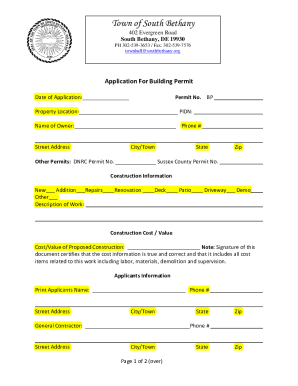
Filling out the DE Application For Building Permit is an essential step for anyone planning construction in South Bethany. This guide provides a comprehensive overview of how to complete the form efficiently and accurately.
Follow the steps to complete your application online.
- Press the ‘Get Form’ button to access the DE Application For Building Permit and open it for completion.
- Begin with the date of application. Enter the current date in the provided field to indicate when you are submitting the application.
- In the property location section, specify the exact address of the property where the construction will occur. Make sure to include the PIDN (Property Identification Number) if available.
- Next, provide the name of the owner of the property along with their contact phone number. Fill in the owner's street address, city or town, state, and zip code.
- If applicable, enter any other permits that may be relevant, such as the DNRC Permit Number or Sussex County Permit Number.
- Select the type of construction you are planning from the options provided: new construction, addition, repairs, renovation, deck, patio, driveway, demolition, or other. You may choose multiple options as needed.
- Provide a detailed description of the work you intend to carry out. Make this as clear as possible to ensure understanding by the reviewing authority.
- Indicate the total construction cost or value in the designated field. Remember that this figure must reflect all associated costs, including labor, materials, demolition, and supervision.
- In the applicants' information section, print the applicant's name and their contact number, along with the mailing address, similar to the property owner's section.
- If you are working with a general contractor, fill in their details including name and contact number, along with their street address, city or town, state, and zip code.
- Indicate whether you are providing plans or drawings as well as a survey/site plan by marking 'Yes' or 'No' in the respective fields.
- Complete the area measurements as required, including lot area, living area, non-living area, and any required ratios or additional construction details.
- Identify if the project falls within a flood zone and include any relevant construction specifics, such as footings type, roof pitch, and number of bathrooms planned.
- Certify applicant information by signing the certification statement provided. This certifies that all information is true and that you understand the responsibilities that accompany the application.
- Finally, complete the permit fee calculation section and determine the total fee, which can include minimum or area-based calculations. Enter the payment method details before signing and dating the application.
- Once all fields have been completed accurately, save your changes, and prepare to download, print, or share the form as required.
Complete your DE Application For Building Permit online today to ensure your construction project is initiated smoothly.
A building permit is required regardless of the size and type. Three (3) copies of a plot plan/mortgage survey must be submitted to the License and Inspection Department showing the exact placement of the proposed shed drawn on the survey plan.
Industry-leading security and compliance
US Legal Forms protects your data by complying with industry-specific security standards.
-
In businnes since 199725+ years providing professional legal documents.
-
Accredited businessGuarantees that a business meets BBB accreditation standards in the US and Canada.
-
Secured by BraintreeValidated Level 1 PCI DSS compliant payment gateway that accepts most major credit and debit card brands from across the globe.