Loading
Get Md Master Certified Emissions Technician Application 2016-2026
How it works
-

Open form follow the instructions
-

Easily sign the form with your finger
-

Send filled & signed form or save
How to fill out the MD Master Certified Emissions Technician Application online
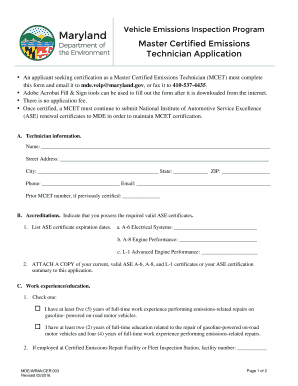
This guide provides step-by-step instructions for completing the MD Master Certified Emissions Technician Application online. Whether you are applying for certification for the first time or renewing your certification, this guide will walk you through each section of the form.
Follow the steps to successfully complete your application online.
- Click ‘Get Form’ button to obtain the form and open it in the editor. Be sure to have a compatible PDF reader ready to fill out the form accurately.
- Begin with Section A: Technician Information. Fill in your full name, street address, city, state, ZIP code, phone number, and email address. If you have a prior MCET number from previous certification, include it here.
- Move to Section B: Accreditations. List the expiration dates for your ASE certificates under the specified categories: A-6 Electrical Systems, A-8 Engine Performance, and L-1 Advanced Engine Performance. Ensure you have copies of your ASE certificates ready to attach.
- In Section C: Work Experience/Education, you need to indicate your eligibility by checking one of the two boxes provided, depending on your work experience or educational background. If applicable, provide the facility number for your employment at a Certified Emissions Repair Facility or Fleet Inspection Station.
- Continue filling in details about your current and prior employers, including their names, addresses, types of repairs performed, dates employed, and the number of hours worked per week. This information helps validate your work experience.
- For your educational background, enter the name of the educational facility, your coursework, and the dates attended. Also, mention the total credits earned.
- Finally, read the certification statement at the bottom of the form. Sign and date it to confirm the accuracy of the information provided. This step is crucial to ensuring your application is not denied due to misinformation.
- Once you have filled out all necessary sections, review your application for accuracy. After confirming that all information is correct, save your changes, then download, print, or share the completed form as needed. Follow the submission instructions to send your application to the designated email or fax.
Complete your application online today for timely processing and certification.
Full-service station fee - $14; Self-service kiosk fee (credit cards only) - $10.