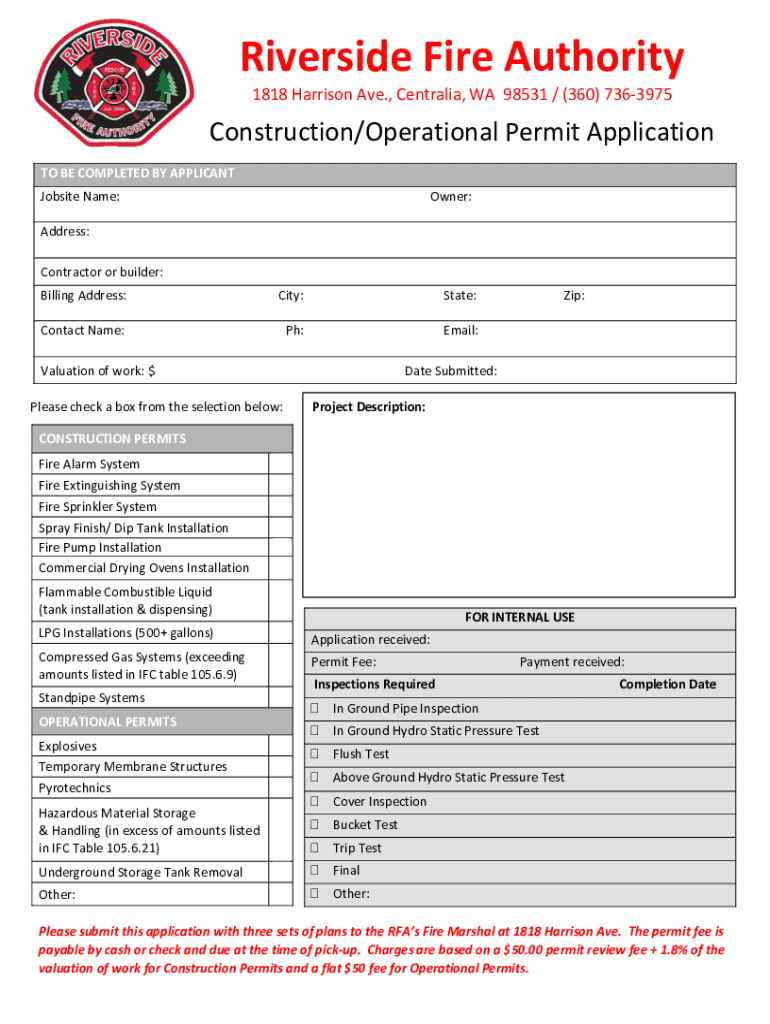
Riverside Fire Authority 1818 Harrison Ave., Central, WA 98531 / (360) 7363975Construction/Operational Permit Application TO BE COMPLETED BY APPLICANT Job site Name:Owner:Address: Contractor or builder:.

Open form follow the instructions

Easily sign the form with your finger

Send filled & signed form or save
How to fill out the WA Construction/Operational Permit Application online
Filling out the Washington Construction/Operational Permit Application online is a straightforward process that requires careful attention to detail. This guide will provide you with step-by-step instructions to ensure your application is completed accurately and efficiently.
Follow the steps to complete the application online.
- Press the ‘Get Form’ button to access the application and open it in your preferred editing tool.
- Begin by entering the jobsite name in the designated field. This should reflect the official name of the location where the work will take place.
- Provide the owner's name in the next field. This should be the person or entity responsible for the property.
- Fill in the address of the jobsite, ensuring all fields are accurately completed, including the street number and name.
- Indicate the contractor or builder’s name. This should be the individual or organization that will perform the work.
- Complete the billing address, ensuring it is current and matches official records.
- Fill in the city and state fields where the project is located.
- Enter the contact person's name who will be responsible for any communication regarding the permit.
- Provide a phone number that can be used to reach the contact person.
- Include an email address for electronic communications and updates about the permit.
- State the valuation of the work in the appropriate field, ensuring it is an accurate estimate of the total project cost.
- Select the applicable box from the options provided for specific construction permits. Each option relates to different systems or installations.
- Describe the project in the project description field, providing a brief overview of the intended work.
- Indicate the date of submission to document when the application is filed.
- Review all entered information for accuracy and completeness.
- At the final step, save any changes made to the application. Users can then download, print, or share the application as required.
Complete your application online today and ensure your project moves forward smoothly.
Experience a faster way to fill out and sign forms on the web. Access the most extensive library of templates available.
Related content
RCW 70A.125.100 Operating permits—Application process—Annual fee—Adoption of...
Washington Building Code and meet setback requirements. ... permits and agencies...
PREFACE. This guidance document is a reference for understanding, completing, and...
Get answers to your most pressing questions about US Legal Forms API.
What happens if you build without a permit in Washington state?
If you build without a permit or fail to get a final inspection approval, we may fine you or take other enforcement action against you.
Who issues a building permit in WA?
As part of the uncertified building approval process, a Building Surveyor, employed by the City of Perth, will conduct the technical assessment and issue the Certificate of Design Compliance and the building permit.
How do I get a construction permit in Washington state?
To apply for a permit: Determine if a local clean air agency issues your permit. If an agency other than Ecology issues your permit, contact them. ... If Ecology issues your permit, contact us. ... Read the permit application instructions. Fill out a SEPA checklist, if required. Fill out a notice of construction application.
How do I get an occupancy certificate in WA?
Applications can be lodged either in hard copy or soft (electronic) copy, and must use the standard Building Commission form, or the electronic/online system where provided by the local government. To gain an occupancy permit, a certificate of compliance needs to be completed to show the building is safe to occupy.
What requires a building permit in Washington state?
Washington State statutes call for local jurisdictions (cities and counties) to require a building permit when any structural change or when alterations are made to an existing building or when any new construction is undertaken.
How to apply for a building permit in Seattle?
Submit your preliminary application materials through your Seattle Services Portal. You will need to create an account if you don't have one. Submit a Building & Land Use Pre-Application to start the construction and land use (MUP) permit process, including all Subject-to-Field-Inspection permits.
How much does a building permit cost in Washington state?
Washington State Building Code Council fees collected for each Building Permit issued - Residential building permit: $6.50 for each building permit, plus an additional surcharge of $2.00 for each residential unit after the first unit.
What can a homeowner do without a permit in Washington state?
You do not need a permit for: A storage shed with a floor area of 200 square feet or less, as an accessory to a residential house or for agricultural use. Fences 6 feet high or less. Most retaining walls 4 feet high or less. Replacement of roofing or siding for detached one and two-family houses.
Use professional pre-built templates to fill in and sign documents online faster. Get access to thousands of forms.
If you believe that this page should be taken down, please follow our DMCA take down process here.