Loading
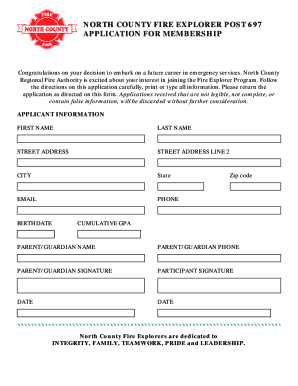
Get Wa Fire Explorer Post 697 Application For Membership - North County 2018-2026
How it works
-

Open form follow the instructions
-

Easily sign the form with your finger
-

Send filled & signed form or save
How to fill out the WA Fire Explorer Post 697 Application For Membership - North County online
Completing the WA Fire Explorer Post 697 Application For Membership online is a straightforward process that sets the foundation for your future in emergency services. This guide will walk you through every step, ensuring you provide the necessary information clearly and accurately.
Follow the steps to successfully complete your application online.
- Press the ‘Get Form’ button to access the application and open it in your preferred online editor.
- Begin filling out the applicant information section. Enter your first name, last name, and street address. If applicable, include any additional address details in the second address line.
- Continue by providing your city, state, zip code, email address, and phone number. Make sure this information is current and correct.
- Next, enter your birthdate and cumulative GPA. Ensure these fields are filled in accurately, as they are important for your application review.
- Provide your parent or guardian’s name and phone number in the respective fields. Ensure they are aware of your application.
- Obtain your parent or guardian’s signature in the designated area, as well as your own signature. Include the date of signing in the appropriate fields.
- Draft and attach your letter of intent according to the given guidelines. Ensure it is addressed to the members of North County Fire Explorer Post 697, clearly expressing your interest in the program.
- After completing all sections, review your application to ensure all entries are legible and complete. Once confirmed, save your changes, then you can download, print, or share the application as needed.
Complete your application online today to take the first step towards an exciting career in emergency services!