Loading
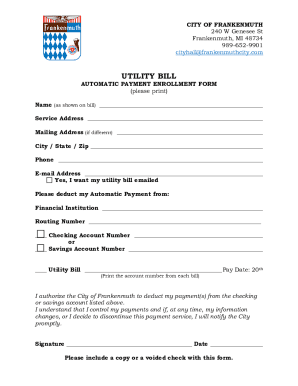
Get Mi Utility Bill Automatic Payment Enrollment Form - City Of Frankenmuth 2021-2025
How it works
-

Open form follow the instructions
-

Easily sign the form with your finger
-

Send filled & signed form or save
How to fill out the MI Utility Bill Automatic Payment Enrollment Form - City Of Frankenmuth online
Filling out the MI Utility Bill Automatic Payment Enrollment Form online can simplify your utility bill payments and ensure that you never miss a due date. This guide will walk you through each step of the process, making it easy to complete your enrollment.
Follow the steps to complete your enrollment form effectively.
- Click ‘Get Form’ button to obtain the form and open it in the editor.
- In the first section, provide your name exactly as it appears on your utility bill to ensure accurate processing.
- Next, enter your service address where the utility service is provided. If your billing address differs, include that in the following field.
- Fill in your mailing address only if it is different from your service address, along with the corresponding city, state, and zip code.
- Enter your phone number in the designated field to facilitate contact regarding your account.
- Provide your email address if you wish to receive your utility bill electronically. Check the box confirming your preference.
- Indicate your financial institution details, including the name and routing number. Specify whether the payment will be deducted from a checking or savings account by marking the appropriate box.
- Input your account number from the utility bill you wish to set for automatic payments, along with the pay date which is set for the 20th of each month.
- Read and understand the authorization statement for automatic deductions, then provide your signature and date to confirm your agreement.
- Lastly, ensure you include a copy or a voided check with your form to verify your account details.
- Save changes, and download or print the completed form for your records before submission.
Enroll in automatic payments online today to take control of your utility bill management!
From the North, take I-75 South to exit 144 and make a left hand turn onto Dixie Hwy.
Industry-leading security and compliance
US Legal Forms protects your data by complying with industry-specific security standards.
-
In businnes since 199725+ years providing professional legal documents.
-
Accredited businessGuarantees that a business meets BBB accreditation standards in the US and Canada.
-
Secured by BraintreeValidated Level 1 PCI DSS compliant payment gateway that accepts most major credit and debit card brands from across the globe.