Loading
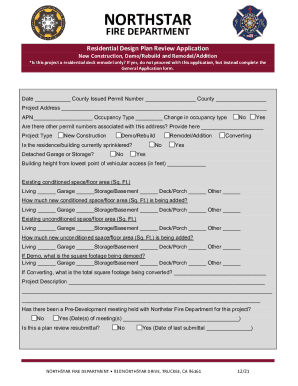
Get Ca Northstar Residential Design Plan Review Application 2021-2026
How it works
-

Open form follow the instructions
-

Easily sign the form with your finger
-

Send filled & signed form or save
How to fill out the CA Northstar Residential Design Plan Review Application online
Completing the CA Northstar Residential Design Plan Review Application online is a crucial step for your construction projects, whether they involve new constructions, remodels, or demolitions. This guide provides you with clear, step-by-step instructions to ensure your application is filled out correctly and efficiently.
Follow the steps to accurately complete your application.
- Click ‘Get Form’ button to obtain the application form and open it in the designated online editor.
- Fill in the date and the county issued permit number if applicable. Ensure you select the correct project address and provide the associated APN (Assessor's Parcel Number).
- Indicate the occupancy type and specify if there is a change in occupancy type by selecting 'Yes' or 'No'.
- Provide information about other permit numbers associated with the project address, if any.
- Select the project type from the options provided: New Construction, Demo/Rebuild, or Remodel/Addition.
- Indicate whether the residence/building is currently sprinklered and if there is a detached garage or storage present.
- Input the building height from the lowest point of vehicular access and fill out the existing and new conditioned space details, such as floor areas for Living, Garage, Storage/Basement, Deck/Porch, and Other.
- If applicable, provide the square footage for the areas being demoed or converted.
- Complete the project description section, providing a detailed overview of the project.
- Specify whether a pre-development meeting has occurred with the Northstar Fire Department regarding the project, and provide the dates if applicable.
- Indicate if this is a plan review resubmittal and, if so, include the date of the last submittal.
- Fill out the contact information for the general contractor, homeowner, and main contact, including names, phone numbers, emails, and mailing addresses.
- Review the required statements and check the boxes after confirming that the requirements have been met before submission.
- Acknowledge that you have read and understood the Northstar Fire Department’s requirements by signing and dating the application.
- Once the form is complete, ensure to save your changes, then download, print, or share the form as necessary.
Start filling out your CA Northstar Residential Design Plan Review Application online today!