Loading
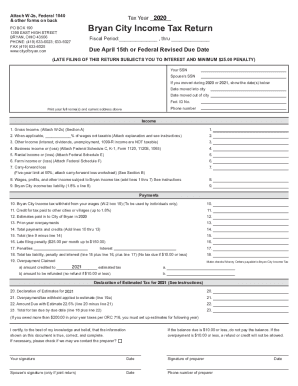
Get Oh Income Tax Return - Bryan City 2018-2026
How it works
-

Open form follow the instructions
-

Easily sign the form with your finger
-

Send filled & signed form or save
How to fill out the OH Income Tax Return - Bryan City online
This guide provides clear, step-by-step instructions for successfully completing the OH Income Tax Return for Bryan City online. Whether you are a seasoned filer or new to the process, this comprehensive resource will assist you in accurately submitting your tax return.
Follow the steps to complete your tax return online.
- Press the ‘Get Form’ button to access the OH Income Tax Return form for Bryan City and open it in your chosen document editor.
- In the first section, print your full name and current address as requested at the top of the form.
- Provide your Social Security Number (SSN) and your spouse's SSN, if applicable.
- Indicate the dates you moved into and out of the city if you relocated during the tax year in question.
- For the income section, start with line 1, where you will report your gross income. Attach your W-2 forms.
- On line 2, if applicable, report the percentage of wages that are not taxable; attach a brief explanation if this applies to you.
- Line 3 is for other income such as interest or dividends, noting that unemployment income and certain types of 1099-R income are not taxable.
- For lines 4 through 6, detail business income or losses, rental income or losses, and farm income or losses. Attach the relevant federal schedules as instructed.
- Compile the total income subject to Bryan income tax on line 8 by adding the amounts from lines 1 through 7.
- Calculate your Bryan City income tax liability by multiplying the total in line 8 by 1.8%; enter this figure in line 9.
- Complete the payments section by reporting any Bryan City income tax withheld from your wages (line 10) and other credits (lines 11-13).
- Add the total payments and credits on line 14.
- Subtract the total payments (line 14) from your tax liability (line 9) to find any amount due or overpayment on line 15.
- If applicable, complete the penalty and interest sections (lines 16-18) which may be necessary due to late filing.
- If you have any overpayment, specify how you would like it credited or refunded on lines 19-23.
- Once you have filled out all sections accurately, you can save changes, download, or print the completed form for submission.
Take action now and complete your OH Income Tax Return for Bryan City online.
Individual IT 40P/IT 40XP payment coupon with paymentOhio Department of Taxation PO Box 182131 Columbus, Ohio 43218-2131IT 1040 without paymentOhio Department of Taxation PO Box 2679 Columbus, Ohio 43270-2679IT 1040 with paymentOhio Department of Taxation PO Box 2057 Columbus, Ohio 43270-205710 more rows • May 8, 2020