Loading
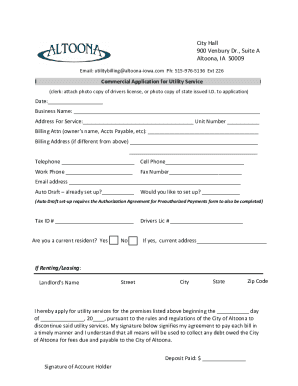
Get Ia Commercial Application For Utility Service - Altoona 2020-2025
How it works
-

Open form follow the instructions
-

Easily sign the form with your finger
-

Send filled & signed form or save
How to fill out the IA Commercial Application For Utility Service - Altoona online
The IA Commercial Application For Utility Service - Altoona is a vital document for businesses seeking utility services in Altoona, Iowa. This comprehensive guide will provide you with step-by-step instructions to effectively complete the application online, ensuring a smooth submission process.
Follow the steps to successfully complete your application online.
- Click ‘Get Form’ button to access the application form and open it in the online editor.
- Enter the date in the designated field. This should reflect the current date or the date you are submitting the application.
- Provide the business name in the appropriate section. Ensure the name is spelled correctly as it appears on your business registration.
- Fill out the address for service, including any unit number if applicable. This address will be where the utility services will be provided.
- Indicate your billing attention point by filling in the owner’s name or the person responsible for accounts payable.
- If the billing address differs from the service address, enter the billing address in the corresponding fields.
- Enter your contact numbers: telephone, cell phone, work phone, and fax number, as applicable. Providing these ensures that the utility company can reach you if necessary.
- Input your email address for communication regarding your utility services.
- Indicate whether you have an auto draft set up for payments and if you wish to establish one. If you want to set it up, you will need to complete the Authorization Agreement for Preauthorized Payments form as well.
- Provide your Tax ID number in the designated field.
- Answer the question regarding current residence status by selecting 'Yes' or 'No'. If yes, provide your current address.
- If you are renting or leasing, fill in your landlord’s name, street address, city, state, and zip code.
- Specify the start date for utility services in the provided fields.
- Review the statement regarding utility services and your agreement to timely payments. Ensure you understand the terms outlined.
- Enter the deposit amount paid, if applicable.
- Finally, provide the signature of the account holder to confirm the agreement and submission of the application.
- After completing the form, save your changes, and consider downloading, printing, or sharing the form as necessary.
Complete your IA Commercial Application For Utility Service - Altoona online today!
Online: Visit ExpressAddress.comOpens in new window to connect or disconnect your water/utility service. In person: Visit Service Regina on the main floor of City Hall weekdays from 8 a.m. to 4:45 p.m. to set up or disconnect your City of Regina water/utility account.
Industry-leading security and compliance
US Legal Forms protects your data by complying with industry-specific security standards.
-
In businnes since 199725+ years providing professional legal documents.
-
Accredited businessGuarantees that a business meets BBB accreditation standards in the US and Canada.
-
Secured by BraintreeValidated Level 1 PCI DSS compliant payment gateway that accepts most major credit and debit card brands from across the globe.