Loading
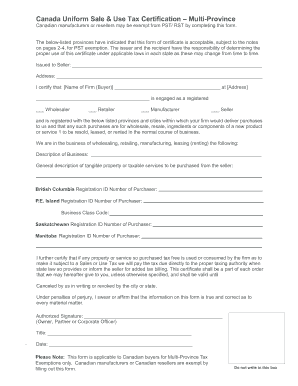
Get Canada Uniform Sale & Use Tax Certification - Multi-province
How it works
-

Open form follow the instructions
-

Easily sign the form with your finger
-

Send filled & signed form or save
How to fill out the Canada Uniform Sale & Use Tax Certification - Multi-Province online
This guide provides clear and concise instructions on how to complete the Canada Uniform Sale & Use Tax Certification - Multi-Province form online. By following these steps, users will ensure that they properly document their tax exemption status, facilitating compliance with provincial requirements.
Follow the steps to complete the certification form accurately.
- Click ‘Get Form’ button to obtain the form and open it in the editor.
- Begin by filling in the 'Issued to Seller' section with the name of the seller.
- Enter the address of the seller in the provided space beneath the name.
- In the certification section, input the name of the firm (buyer) and its address.
- Select the appropriate designation by marking the checkbox for 'Wholesaler', 'Retailer', 'Manufacturer', or 'Seller'.
- Provide the registration ID numbers for each applicable province or city where purchases will be delivered.
- Briefly describe the type of business you are engaged in and provide a general description of the tangible property or taxable services to be purchased from the seller.
- Sign the form in the 'Authorized Signature' section and include your title and the date of signing.
- Review the completed form for accuracy and completeness before submission.
- Save changes, download, print, or share the form as needed.
Complete your Canada Uniform Sale & Use Tax Certification - Multi-Province online today!
Yes, Canada does offer sales tax exemption certificates that allow qualifying purchases to be exempt from sales tax. Businesses must adhere to specific criteria and provide documentation proving their eligibility. Utilizing the Canada Uniform Sale & Use Tax Certification - Multi-Province can help you navigate these exemptions effectively.