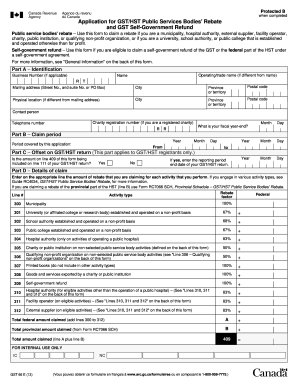
External supplier (on eligible activities) – (See "Lines 310, 311 and 312" on the back of this form) 83% e Total federal amount claimed (add lines 300 to 312) A = Total provincial amount claimed (from Form RC7066 SCH) B e 409 = Total amount claimed (line A plus line B) FOR INTERNAL USE ONLY IC GST66 E (13) NC (Vous pouvez obtenir ce formulaire en français à www.arc.gc.ca ou en composant le 1-800-959-3376.) Protected B when completed Part E – Certification I certify that .
Open form follow the instructions
Easily sign the form with your finger
Send filled & signed form or save
How to fill out the Canada GST66 E online
This guide will assist you in completing the Canada GST66 E form, which is used to apply for the GST/HST Public Services Bodies' Rebate and the GST Self-Government Refund. By following the steps outlined here, you will navigate the form efficiently and accurately.
Follow the steps to complete the Canada GST66 E form online.
- Click ‘Get Form’ button to obtain the form and open it in the editor.
- In Part A, provide identification details including your Business Number if applicable, operating or trade name, full name, mailing address, and physical location details if different from your mailing address. Also, include contact information and charity registration number if you are a registered charity.
- In Part B, indicate your claim period by entering the relevant year and the period covered by this application using the month and day formats.
- In Part C, for GST/HST registrants only, answer whether the amount on line 409 is included on line 111 of your GST/HST return, and if so, enter the reporting period end date.
- In Part D, specify the amount of rebate you are claiming for each activity performed. Refer to the designated activity types and their associated federal factors to ensure accurate entries.
- Calculate and enter the total federal amount claimed as well as any provincial amount if applicable. Sum these to arrive at the total amount claimed on line 409.
- In Part E, certify the information by printing your name, title, and signing the form, while also including a contact telephone number and the date.
- Review all sections for completeness and accuracy before saving changes, downloading, printing, or sharing the form.
Complete your Canada GST66 E form online to ensure a smooth submission process.
Experience a faster way to fill out and sign forms on the web. Access the most extensive library of templates available.
Related content
by A Erazo · 2010 · Cited by 28 — Baculoviruses expressing glutathione S-transferase...
Crime prevention through environmental design (CPTED) guidelines have been adopted in...
Le présent appareil numérique n'émet pas de bruits radioélectriques dépassant les...
Get answers to your most pressing questions about US Legal Forms API.
What is Canada on my bank statement?
Seeing 'Canada' on your bank statement likely refers to a transaction or deposit originating from a Canadian entity. This could represent a payment received from a Canadian company, government, or even cross-border transactions. It’s important to identify the source of these funds for effective record-keeping. If you need help interpreting your bank statement or managing finances, uslegalforms provides various financial tools.
What does deposit Canada mean in my bank account?
When you see 'deposit Canada' in your bank account, it generally indicates that a payment has been credited to your account. This deposit could stem from salary payments, government benefits, or other reimbursements. Understanding these deposits can help you manage your budget better and ensure accuracy in your financial records. If you are looking for better ways to handle your personal finances, uslegalforms has helpful resources.
What is a bank statement Canada?
A bank statement in Canada is a summary of your account’s transactions over a specific period. It includes deposits, withdrawals, fees, and interest earned, reflecting the financial activity in your account. Reviewing your bank statement regularly can help you track your spending and manage your finances effectively. If you need templates for financial tracking, uslegalforms offers various options to simplify your accounting.
Why did I get a payment from Canada?
Receiving a payment from Canada could be due to various reasons, such as a tax refund, benefits, or pensions. If you recently filed taxes or were eligible for benefits, this payment might be part of that process. It’s essential to check your records or contact the issuing agency for clarification on the payment. If you need help managing these documents, uslegalforms can provide the necessary templates.
How do I report foreign independent contractor income?
To report income earned as a foreign independent contractor, you must include it in your Canadian tax return. The Canada GST66 E form is beneficial for this task, ensuring that your income is accurately documented. Additionally, remember to convert your earnings to Canadian currency using the appropriate exchange rate to maintain compliance.
How do I report foreign self-employment income?
Reporting foreign self-employment income involves listing your earnings on your tax return. The Canada GST66 E form plays a pivotal role in this process, especially for Canadian tax residents. Be sure to convert your income into Canadian dollars and keep records of your foreign income to avoid complications later.
How do I declare self-employed income in Canada?
To declare self-employed income in Canada, you need to track your earnings and associated expenses throughout the year. When it's time to file your taxes, you will use the Canada GST66 E form to report this information. This form helps ensure compliance with tax regulations while also optimizing your potential deductions.
How do I file for self-employment income in Canada?
Filing for self-employment income in Canada requires reporting your income and expenses on the appropriate tax forms. The Canada GST66 E form is particularly useful for this purpose. By accurately documenting your earnings and deductions, you can responsibly manage your tax liability and take advantage of any applicable rebates.
How to file GST rebate in Canada?
Filing a GST rebate in Canada involves completing the relevant forms and submitting them along with supporting documentation. Using the Canada GST66 E form will streamline your process, as it is specifically designed for self-employed individuals. Make sure to follow all guidelines and retain any receipts for a smooth filing experience.
How do I report foreign self-employment income in Canada?
To report foreign self-employment income in Canada, you need to include it on your Canadian tax return. The Canada GST66 E form is essential for this process. Start by converting your income to Canadian dollars using the exchange rate on the date you received it. This ensures accurate reporting and compliance with Canadian tax laws.
Use professional pre-built templates to fill in and sign documents online faster. Get access to thousands of forms.
If you believe that this page should be taken down, please follow our DMCA take down process here.
This form is available in several versions. Select the version you need from the drop-down list below.