Loading
Get Canada 5013-r 2010
How it works
-

Open form follow the instructions
-

Easily sign the form with your finger
-

Send filled & signed form or save
How to fill out the Canada 5013-R online
Filling out the Canada 5013-R form is a crucial step for non-residents and deemed residents of Canada filing their income tax returns. This guide provides clear, step-by-step instructions to help you navigate the form online with ease.
Follow the steps to complete the Canada 5013-R online.
- Press the ‘Get Form’ button to access the Canada 5013-R form and open it in your preferred online editor.
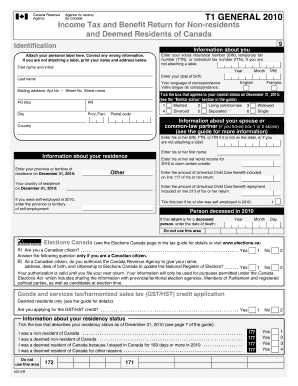
- Begin by entering your identification information. This includes your first name, last name, and social insurance number (SIN), temporary tax number (TTN), or individual tax number (ITN). If you are not attaching a label, make sure to print your name and address clearly.
- Input your date of birth by selecting the year, month, and day from the dropdown menus provided.
- Choose your language of correspondence by selecting English or Français.
- Enter your mailing address, including the apartment number, street number, street name, city, province/territory, and postal code.
- Indicate your marital status as of December 31, 2010, by ticking the appropriate box among the options provided (e.g., married, single, divorced).
- If applicable, provide information about your spouse or common-law partner, including their SIN, first name, net world income for 2010, and any Universal Child Care Benefits related to their return.
- Specify your province or territory of residence on December 31, 2010, and indicate whether you were self-employed during 2010.
- If this return is for a deceased person, enter the date of death as requested.
- Respond to the Canadian citizenship question and indicate if you authorize the Canada Revenue Agency to share your information with Elections Canada.
- If applicable, indicate whether you are applying for the GST/HST credit by selecting yes or no.
- Complete the residency status section by ticking the box that best describes your situation on December 31, 2010.
- Fill out the total income section, including all relevant income sources as outlined in the form.
- Follow the instructions to report your deductions and calculate your taxable income based on your total income.
- Once all sections are complete, save your changes and utilize the options to download, print, or share the finished form.
Start completing your Canada 5013-R online today for a seamless filing experience.
Get form
Experience a faster way to fill out and sign forms on the web. Access the most extensive library of templates available.
Filing for self-employment income in Canada involves reporting all income earned from your business activities. Use the Canada 5013-R form to accurately report your income and any business expenses. Adhering to the annual filing deadlines is crucial to ensure compliance. You can find resources on platforms like US Legal Forms that assist in efficiently navigating this process.
Get This Form Now!
Use professional pre-built templates to fill in and sign documents online faster. Get access to thousands of forms.