Loading
Get Va Permit Application - City Of Richmond 2016-2025
How it works
-

Open form follow the instructions
-

Easily sign the form with your finger
-

Send filled & signed form or save
How to fill out the VA Permit Application - City of Richmond online
Filling out the VA Permit Application for the City of Richmond online can seem daunting, but this guide will provide clear instructions to simplify the process. Whether you are applying for a new permit or renewing an existing one, our step-by-step guidance will ensure that you complete the form accurately and efficiently.
Follow the steps to successfully complete your application.
- Press the 'Get Form' button to access the VA Permit Application, making the form available for you to fill out.
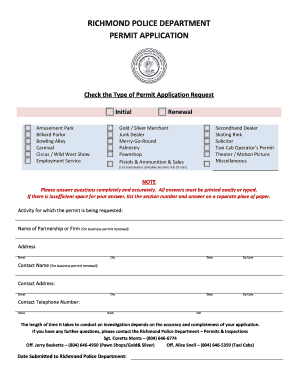
- Begin by checking the type of permit application request at the top of the form. Select whether you are applying for an initial permit or a renewal, and specify the exact type of permit you seek, such as amusement park or taxi cab operator.
- Provide details about the activity for which the permit is requested. Include the name of the partnership or firm for business permit renewals and ensure the address is complete with street, city, state, and zip code.
- Fill in the contact information for the business permit renewal, including contact name, address, and telephone numbers for home, work, and cell.
- Complete Section 1, Personal History, confirming that you provide your legal name, other names used, social security number, race, sex, and physical description. Additionally, include your date and place of birth.
- In Section 2, Driving History, provide information on any vehicle operator's license you have held, including the type of license and state of issuance. Document all traffic violations or citations received in the past ten years.
- Section 3 requires employment history. Begin with your current employer and work backward, providing details such as the employer's name, address, telephone number, position held, and reason for leaving.
- Respond to questions in Section 4 regarding any previous denials of permits or licenses and employment by law enforcement agencies.
- In Section 5, Residential History, list all previous addresses starting with your current one, including dates and full addresses.
- Complete Section 6 with information about your family and household. Include the names and addresses of family members.
- For Section 7, list five personal references, ensuring that you do not include relatives or employees.
- If applying for a taxi cab operator's permit, complete Section 8 with relevant questions about your driving history and current employer details.
- In Sections 9 and 10, provide business information if you are renewing a business permit or applying as a licensed dealer.
- After filling out the application, review all entered information for accuracy and completeness. Finally, sign the declaration page, acknowledging that information provided is truthful and complete.
- Save your changes, print a copy for your records, and submit your application as required by the Richmond Police Department.
Start your application process today to ensure a smooth experience in obtaining your VA Permit online.
Industry-leading security and compliance
US Legal Forms protects your data by complying with industry-specific security standards.
-
In businnes since 199725+ years providing professional legal documents.
-
Accredited businessGuarantees that a business meets BBB accreditation standards in the US and Canada.
-
Secured by BraintreeValidated Level 1 PCI DSS compliant payment gateway that accepts most major credit and debit card brands from across the globe.