Loading
Get Va Dgs-30-104 (form Co-12) 2015-2025
How it works
-

Open form follow the instructions
-

Easily sign the form with your finger
-

Send filled & signed form or save
How to fill out the VA DGS-30-104 (Form CO-12) online
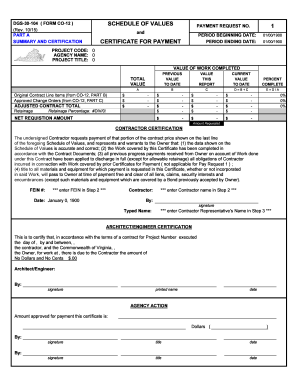
Filling out the VA DGS-30-104 (Form CO-12) online can simplify the process of requesting payment for contracted work. This guide will provide clear and detailed instructions for users to successfully complete the form.
Follow the steps to fill out the form accurately and efficiently.
- Click the ‘Get Form’ button to access the form and open it in the document editor.
- Begin by entering your Federal Employer Identification Number (FEIN) in the designated field. This unique number is essential for identification and processing of your payment request.
- Next, fill in the contractor's name where prompted. Ensure that the name matches the legal entity as recognized in the contract.
- Provide the corresponding date for the contractor representative's signature. This date reflects when the information was finalized and certified.
- Complete the 'payment request number' along with the 'period beginning date' and 'period ending date' for which the payment is being requested. Ensure that these dates accurately correspond to the timeframe of the work completed.
- In the section labeled 'Schedule of Values,' input the total value of work completed to date and the adjusted contract total. Accurately record any retainage percentage as per your contract agreement.
- Complete the 'current value to date' and 'percent complete' sections for each contract line item. Use precise calculations to ensure the amounts reflect true progress on the project.
- Once you have filled out the entire form and reviewed the information for accuracy, you can save your changes. Depending on your needs, you may download, print, or share the completed form for submission.
Start filling out your VA DGS-30-104 (Form CO-12) online today to streamline your payment request process.
Industry-leading security and compliance
US Legal Forms protects your data by complying with industry-specific security standards.
-
In businnes since 199725+ years providing professional legal documents.
-
Accredited businessGuarantees that a business meets BBB accreditation standards in the US and Canada.
-
Secured by BraintreeValidated Level 1 PCI DSS compliant payment gateway that accepts most major credit and debit card brands from across the globe.