Loading
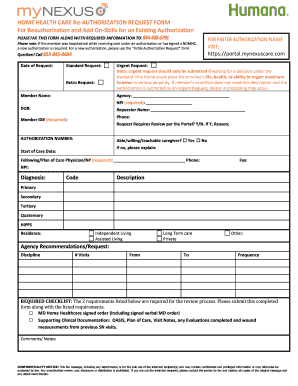
Get Mynexus Home Health Care Re-authorization Request Form For Reauthorization And Add On-skills For An
How it works
-

Open form follow the instructions
-

Easily sign the form with your finger
-

Send filled & signed form or save
How to fill out the MyNEXUS Home Health Care Re-Authorization Request Form for Reauthorization and Add On-Skills online
This guide provides clear, step-by-step instructions on how to effectively fill out the MyNEXUS Home Health Care Re-Authorization Request Form for Reauthorization and Add On-Skills. By following these guidelines, users will be equipped to complete the form efficiently and accurately.
Follow the steps to complete the form online:
- Click ‘Get Form’ button to obtain the form and open it in the editor.
- Begin by entering the date of the request in the designated field at the top of the form.
- Indicate the type of request by selecting either 'Standard Request,' 'Retro Request,' or 'Urgent Request'. Ensure you understand that urgent requests should only be made when necessary.
- Fill in the member's name and date of birth (DOB) in the required sections to identify the individual receiving care.
- Provide the member identification number (ID#) to relate the authorization request back to the member's account.
- Enter the name and phone number of the requestor to establish a point of contact regarding the request.
- For the agency section, include the agency name and the National Provider Identifier (NPI) number, as these are required to process the request.
- Complete the diagnosis section by entering appropriate codes and descriptions for the member’s condition, detailing primary, secondary, tertiary, and quaternary diagnoses.
- Indicate the member's residence type from the provided options, such as Independent Living, Assisted Living, Long Term Care, or Private.
- Detail the agency recommendations or requests, including the discipline, number of visits, frequency, and duration. This information will help align care with member needs.
- Review the required checklist and attach the necessary documentation, including a signed MD Home Healthcare order and relevant clinical documentation like OASIS or visit notes.
- Add any comments or notes that may assist in the processing of the re-authorization request before concluding.
- Upon completion, ensure all information is accurate, save your changes, and utilize the options to download, print, or share the form, as needed.
Complete your MyNEXUS Home Health Care Re-Authorization Request Form online today for a streamlined experience.
Industry-leading security and compliance
US Legal Forms protects your data by complying with industry-specific security standards.
-
In businnes since 199725+ years providing professional legal documents.
-
Accredited businessGuarantees that a business meets BBB accreditation standards in the US and Canada.
-
Secured by BraintreeValidated Level 1 PCI DSS compliant payment gateway that accepts most major credit and debit card brands from across the globe.