Loading
Get Canada Esdc Emp5627 E 2022-2026
How it works
-

Open form follow the instructions
-

Easily sign the form with your finger
-

Send filled & signed form or save
How to fill out the Canada ESDC EMP5627 E online
This guide provides clear and supportive instructions on how to efficiently complete the Canada ESDC EMP5627 E form online. By following these steps, users can navigate the application process with confidence.
Follow the steps to successfully complete your application.
- Click the ‘Get Form’ button to obtain the form and open it in an editor for completion.
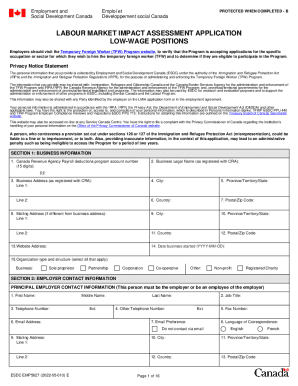
- Begin by entering the business information in Section 1. This includes your Canada Revenue Agency Payroll deductions program account number, business legal name, and business address.
- In Section 2, complete the employer contact information. Provide the primary employer contact's first name, last name, job title, telephone number, and email address. Ensure accurate details are entered as this person will be communicated with throughout the process.
- If applicable, include alternate employer contact information in the same section. Fill in their details as previously described.
- Proceed to Section 3 if you are appointing a third-party representative. Provide their contact information if yes, and make sure to indicate whether they are being paid to represent you.
- In Section 4, address the labour market impacts of hiring a temporary foreign worker. Answer the questions regarding the potential effect on the employment of Canadians or permanent residents.
- Fill out Section 5 with the details regarding the job offer. Specify the number of temporary foreign workers being applied for, job title, and a detailed description of the job duties.
- Next, in Section 6, describe the work location in detail, including the operating name and address of where the TFW will work.
- In Section 7, detail the hours, pay, and benefits being offered to the TFW. Include wage details, the expected working hours per week, and benefits offered.
- Section 8 focuses on recruitment efforts. Outline any recruitment methods used to seek Canadian applicants before the LMIA application.
- In Section 9, provide information on accommodations for the TFW, if applicable.
- Complete Section 10 regarding the cap for low-wage positions, ensuring to determine whether you meet the exemption criteria.
- In Section 11, review the employer responsibilities to familiarize yourself with obligations concerning the TFW.
- Make sure to complete Section 12, which is the checklist for required documentation before submission. Verify that all required documents are included.
- Sign and complete Sections 13 through 15 regarding third-party representation and the declaration of the employer. Ensure that all signatures are provided appropriately.
- Finally, save your changes, download, print, or share the completed form as needed.
Start completing the Canada ESDC EMP5627 E form online today to ensure a smooth application process.
Related links form
A positive LMIA will show that there is a need for a foreign worker to fill the job. It will also show that no Canadian worker or permanent resident is available to do the job. A positive LMIA is sometimes called a confirmation letter. If the employer needs an LMIA, they must apply for one.