Loading
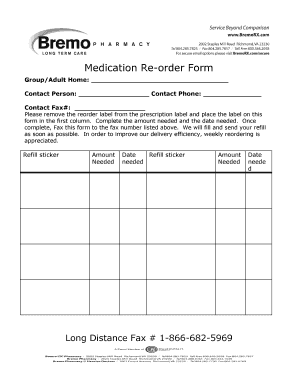
Get Va Bremo Pharmacy Medication Re-order Form 2015-2026
How it works
-

Open form follow the instructions
-

Easily sign the form with your finger
-

Send filled & signed form or save
How to fill out the VA Bremo Pharmacy Medication Re-order Form online
This guide provides clear instructions for filling out the VA Bremo Pharmacy Medication Re-order Form online. By following these steps, users can ensure an efficient and accurate re-ordering process for medications.
Follow the steps to complete the medication re-order form correctly
- Click ‘Get Form’ button to access the VA Bremo Pharmacy Medication Re-order Form and open it in your preferred editor.
- In the first field, enter the name of your group or adult home in the designated space.
- Provide the contact person's name in the next field to identify who will be responsible for the order.
- Input the contact phone number of the person listed above, ensuring that it is accurate for any follow-up or inquiries.
- Fill out the contact fax number in the appropriate field, which is necessary for the pharmacy to receive your order efficiently.
- Remove the reorder label from the prescription label and attach it to the first column of the form as indicated.
- Complete the amount needed for each medication by writing the specific quantity in the designated area.
- Enter the date when you need the refill in the correct field, ensuring it corresponds with your medication needs.
- If there are multiple medications, repeat steps 6 to 8 for additional refill stickers by placing them in the following rows.
- Once all necessary fields are filled out accurately, fax the completed form to the provided fax number for processing.
- To enhance efficiency, consider weekly reordering if applicable, and keep a copy of the form for your records.
Start filling out your VA Bremo Pharmacy Medication Re-order Form online today to ensure timely medication refills.