Loading
Get Md Takoma Park No Cause Notice 2013-2026
How it works
-

Open form follow the instructions
-

Easily sign the form with your finger
-

Send filled & signed form or save
How to fill out the MD Takoma Park No Cause Notice online
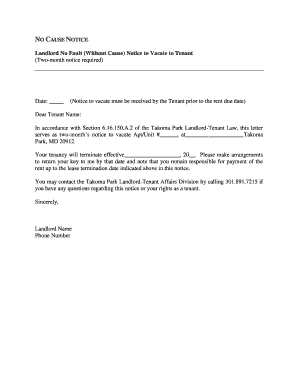
The MD Takoma Park No Cause Notice is an important document that informs a tenant of their obligation to vacate a rental property. This guide provides step-by-step instructions for completing the form online to ensure clarity and compliance with local regulations.
Follow the steps to fill out the MD Takoma Park No Cause Notice online.
- Press the ‘Get Form’ button to obtain the MD Takoma Park No Cause Notice and open it in your preferred editor.
- Fill in the date at the top of the notice, indicating when the notice is being issued. Ensure this date is prior to the rentable date mentioned in the notice.
- Address the notice to the tenant by entering their name in the 'Dear Tenant Name' section to personalize the document.
- Complete the section indicating the apartment or unit number from which the tenant is required to vacate by filling in 'Apt/Unit #' and the corresponding address on the line provided.
- Indicate the effective date of tenancy termination in the format indicated. This date should be two months from the date you filled out the notice.
- Remind the tenant to return the keys by the termination date and clarify their responsibility for rent until that date.
- Add your name in the 'Sincerely' section along with your phone number at the bottom of the notice to allow the tenant to reach you for any questions.
- Review the completed notice for accuracy, ensuring that all fields are properly filled. Save your changes, and then you have the option to download, print, or share the completed form as necessary.
Complete and submit your documents online today for a smooth process.
No Eviction Without Court Order. Written Notice to Tenant. Landlord May File a Complaint. Notice of the Trial to the Tenant.