Loading
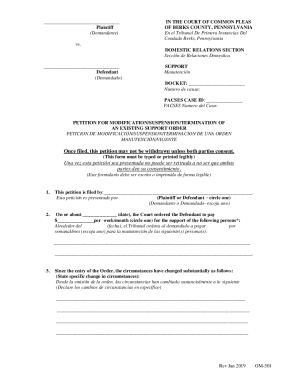
Get Pa Om-501 - Berks County 2019-2026
How it works
-

Open form follow the instructions
-

Easily sign the form with your finger
-

Send filled & signed form or save
How to fill out the PA OM-501 - Berks County online
Filling out the PA OM-501 form for Berks County can seem daunting, but with the right guidance, it becomes straightforward. This guide will provide you with step-by-step instructions to help you complete the online form accurately and effectively.
Follow the steps to fill out the form correctly
- Press the ‘Get Form’ button to access the online form and open it for editing.
- Begin by identifying the party filing the petition. In the first section, clearly indicate whether you are the Plaintiff or Defendant by circling the appropriate option.
- In the next section, provide the date when the court ordered the current support payments. Indicate the amount that is required to be paid per week or month by circling the correct option.
- List the persons who are receiving support. Ensure that their names are entered clearly and completely.
- In section three, explain how your circumstances have changed since the last order was issued. Be as specific and detailed as possible to support your request.
- In the next area, state your request to the court regarding the support order by selecting whether you seek to modify, give credit on, suspend, or terminate the current order.
- Complete the verification section by signing and dating the form to confirm that all statements are true and correct.
- After filling out the form, ensure you save the changes. You can then download a copy, print the form, or share it as necessary for submission.
Complete your documents online for a smooth filing process.
How do I request a support order modification? Contact your local DRS to obtain a Petition for Modification. You may also log into the child support website at .childsupport.state.pa.us as a payee or payor and submit a Petition for Modification through E-Services.