Loading
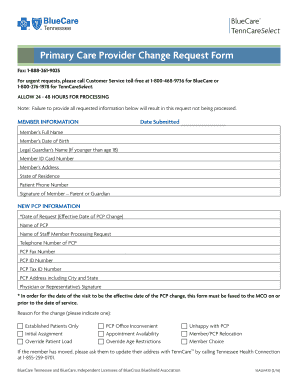
Get Tn Bluecare Primary Care Provider Change Request Form 2016-2026
How it works
-

Open form follow the instructions
-

Easily sign the form with your finger
-

Send filled & signed form or save
How to fill out the TN BlueCare Primary Care Provider Change Request Form online
This guide will walk you through the process of completing the TN BlueCare Primary Care Provider Change Request Form online. By following these steps, you can ensure that your request is accurately submitted and processed efficiently.
Follow the steps to fill out the form correctly.
- Click ‘Get Form’ button to access the request form and open it in your preferred editing tool.
- In the 'Member Information' section, provide your full name, date of birth, and if you are under 18, include the legal guardian’s name. Fill in your Member ID card number, address, state of residence, and phone number. Ensure you sign the form where indicated.
- For the 'New PCP Information' section, enter the date of your request and the name of your new Primary Care Provider (PCP). Include the telephone number and fax number of your new PCP, along with their ID number and tax ID number. Additionally, fill in the PCP's address, including the city and state.
- Have the physician or representative sign the form in the designated area.
- Indicate the reason for the change from the options provided. Ensure you check one of the boxes to specify the reason for your request.
- If you have recently moved, remember to update your address with TennCare by calling the Tennessee Health Connection.
- Once all sections of the form are completed, review your information for accuracy. You can then save the changes, download the form, print a copy, or share it as needed.
Complete your TN BlueCare Primary Care Provider Change Request Form online today for a smooth transition.
Prior authorization (PA) may be required via BCBSTX's medical management, eviCore® healthcare, Carelon Medical Benefits Management effective March 1, 2023 (formerly AIM) or Magellan Healthcare®. You can review how to submit PA or Notification requests and view PA statistical data here.