Loading
Get Ph Maxicare Fo-uef-0 2019-2026
How it works
-

Open form follow the instructions
-

Easily sign the form with your finger
-

Send filled & signed form or save
How to fill out the PH Maxicare FO-UEF-0 online
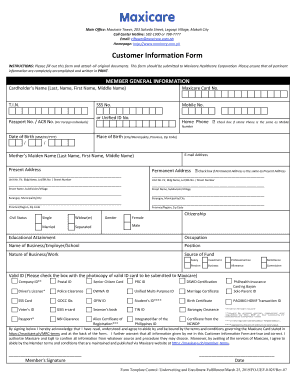
This guide provides comprehensive instructions on filling out the PH Maxicare FO-UEF-0 form online. It aims to assist users in accurately completing the Customer Information Form for Maxicare Healthcare Corporation.
Follow the steps to complete the form effectively.
- Click ‘Get Form’ button to obtain the form and open it in the editor.
- Fill in the member general information section. Start with the cardholder’s name by entering the last name, first name, and middle name as required. Then, provide the Maxicare card number, T.I.N., mobile number, and SSS number if available.
- For foreign individuals, include the passport or ACR number, and indicate the date of birth using the format MM/DD/YYYY. If you have a unified ID number, you may enter that instead.
- Input the home phone number. If it is the same as the mobile number, check the corresponding box.
- Provide the place of birth by filling in the city or municipality, province, and ZIP code.
- Enter the email address and mother’s maiden name in the designated fields.
- Complete the present and permanent address sections. If these addresses are the same, check the appropriate box.
- Fill in the civil status and gender by selecting the relevant options.
- Input the citizenship, educational attainment, occupation, and business or employer details.
- Specify your position and the nature of your business or work. Indicate the source of funds by selecting the relevant option.
- Select the box corresponding to the valid ID that will be submitted to Maxicare from the list provided.
- Review all the information entered for accuracy. It is essential to ensure that all pertinent information is correctly completed.
- Sign on the designated line to confirm that you have read and understood the terms and conditions, along with the date of signing.
- Once everything is filled out, save the changes, then download, print, or share the form as necessary.
Complete your documents online to ensure a smooth and efficient submission process.
After you purchase from the online shop, you need to activate your eVoucher with reference number before you can use it.