Loading
Form preview
  • US Legal Forms
  • Other Templates
  • More Forms
  • More Multi-State Forms
  • Canada Coughlin Medical Expense Claim Form 2018

Get Canada Coughlin Medical Expense Claim Form 2018-2026

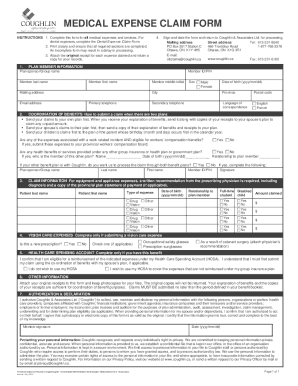
MEDICAL EXPENSE CLAIM FORM INSTRUCTIONS 1. Complete this form for all medical expenses and services. For dental expenses, complete the Dental Expense Claim Form. 2. Print clearly and ensure that all.

How it works

  1. Open form

    Open form follow the instructions

  2. Easily sign form

    Easily sign the form with your finger

  3. Share form

    Send filled & signed form or save

How to fill out the Canada Coughlin Medical Expense Claim Form online

Completing the Canada Coughlin Medical Expense Claim Form online is a straightforward process that ensures you can efficiently submit your medical expenses for reimbursement. This guide will walk you through each section of the form with clear instructions to help you easily navigate the claim process.

Follow the steps to fill out the form accurately and effectively.

  1. Click ‘Get Form’ button to access the claim form and open it in your preferred editing tool.
  2. Fill out the Plan Member Information section. Include details such as the plan sponsor/group name, your member ID/PIN, and your contact information. Make sure to provide your date of birth and select the language of correspondence.
  3. In the Coordination of Benefits section, indicate if any of the expenses are related to a work incident or other insurance plans. Provide details as required, including who the member of the other plan is and their relationship to you.
  4. Complete the Claim Information section by specifying the type of expenses you're claiming, such as drugs or vision care. Make sure to list each family member involved and include any necessary recommendations from healthcare providers.
  5. If applicable, fill out the Vision Care Expenses section indicating if the claim is for a new prescription or for other specific eyewear.
  6. If you have a Health Care Spending Account, state your eligibility and your intention regarding the use of those funds for the expenses being claimed.
  7. Attach original receipts for each expense claimed and ensure you keep copies for your records. Sign and date the form before submission.
  8. Finally, save changes, download, print, or share the completed form as needed for your records and submission.

Access the Canada Coughlin Medical Expense Claim Form online and start your claim process today.

Get form

Experience a faster way to fill out and sign forms on the web. Access the most extensive library of templates available.
Get form

Related content

Patient Protection and Affordable Care Act...
Summary. This document contains interim final regulations implementing the rules for group...
Learn more
Using massive health insurance claims data to...
by JM Maisog · 2019 — Our model for predicting health costs was constructed from...
Learn more
Clinician's Guide to Assessing and Counseling...
It can also be useful to explore the cost/benefit of driving (such as car maintenance and...
Learn more

Related links form

At Home Program Forms 2020 7 Day Notice To Quit Michigan Pdf 2020 Predial Servitude Agreement - Ascensionparish 2020 U.S. Air Force Form Aetc1705. Free Download 2020

Questions & Answers

Get answers to your most pressing questions about US Legal Forms API.

Contact support

You can contact a Coughlin customer service representative directly by dialing 613-231-4433 within the Ottawa area, or toll-free at 1-888-304-2894. Policy | Premiums | Application | Other forms | Privacy | Coughlin & Associates Ltd.

Convenience: Coughlin & Associates plan members enjoy the freedom of accessing plan information and submitting claims using our cutting edge app for iPhone and Android, or online via our plan member portal.

Complete the Change in Plan Member Information form available on the Coughlin & Associates website at .coughlin.ca to update/change any of your member information, including dependents and beneficiaries; or, login to the plan member portal or mobile app to update/change your mailing address, email address, phone ...

Get This Form Now!

Use professional pre-built templates to fill in and sign documents online faster. Get access to thousands of forms.
Get form
If you believe that this page should be taken down, please follow our DMCA take down processhere.
Get Canada Coughlin Medical Expense Claim Form
Get form
  • Adoption
  • Bankruptcy
  • Contractors
  • Divorce
  • Home Sales
  • Employment
  • Identity Theft
  • Incorporation
  • Landlord Tenant
  • Living Trust
  • Name Change
  • Personal Planning
  • Small Business
  • Wills & Estates
  • Packages A-Z
  • Affidavits
  • Bankruptcy
  • Bill of Sale
  • Corporate - LLC
  • Divorce
  • Employment
  • Identity Theft
  • Internet Technology
  • Landlord Tenant
  • Living Wills
  • Name Change
  • Power of Attorney
  • Real Estate
  • Small Estates
  • Wills
  • All Forms
  • Forms A-Z
  • Other Templates
  • Legal Hub
  • About Us
  • Help Portal
  • Legal Resources
  • Blog
  • Affiliates
  • Contact Us
  • Delete My Account
  • Site Map
  • Industries
  • Forms in Spanish
  • Localized Forms
  • State-specific Forms
  • Forms Kit
  • Real Estate Handbook
  • All Guides
  • Notarize
  • Incorporation services
  • For Consumers
  • For Small Business
  • For Attorneys
  • USLegal
  • FormsPass
  • pdfFiller
  • signNow
  • altaFlow
  • DocHub
  • Instapage
Form Packages
  • Adoption
  • Bankruptcy
  • Contractors
  • Divorce
  • Home Sales
  • Employment
  • Identity Theft
  • Incorporation
  • Landlord Tenant
  • Living Trust
  • Name Change
  • Personal Planning
  • Small Business
  • Wills & Estates
  • Packages A-Z
Form Categories
  • Affidavits
  • Bankruptcy
  • Bill of Sale
  • Corporate - LLC
  • Divorce
  • Employment
  • Identity Theft
  • Internet Technology
  • Landlord Tenant
  • Living Wills
  • Name Change
  • Power of Attorney
  • Real Estate
  • Small Estates
  • Wills
  • All Forms
  • Forms A-Z
  • Other Templates
Customer Service
  • Legal Hub
  • About Us
  • Help Portal
  • Legal Resources
  • Blog
  • Affiliates
  • Contact Us
  • Delete My Account
  • Site Map
  • Industries
  • Forms in Spanish
  • Localized Forms
  • State-specific Forms
  • Forms Kit
Legal Guides
  • Real Estate Handbook
  • All Guides
Prepared for you
  • Notarize
  • Incorporation services
Our Customers
  • For Consumers
  • For Small Business
  • For Attorneys
Our Sites
  • USLegal
  • FormsPass
  • pdfFiller
  • signNow
  • altaFlow
  • DocHub
  • Instapage
Social Media
Call us now toll free:
+1 833 426 79 33
As seen in:
© Copyright 1999-2026 airSlate Legal Forms, Inc. 17 Station Street, Ste. 203, Brookline, MA 02445
  • Your Privacy Choices
  • Terms of Service
  • Privacy Notice
  • Content Takedown Policy
  • Bug Bounty Program