Loading
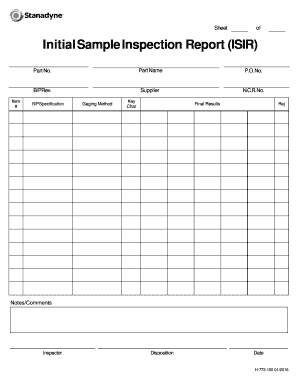
Get Stanadyne H-773-100 2016-2026
How it works
-

Open form follow the instructions
-

Easily sign the form with your finger
-

Send filled & signed form or save
How to fill out the Stanadyne H-773-100 online
Filling out the Stanadyne H-773-100 form online is a straightforward process that helps ensure accurate reporting of inspection results. This guide will walk you through each section of the form, providing clear instructions for successful completion.
Follow the steps to complete the Stanadyne H-773-100 form accurately.
- Click the ‘Get Form’ button to obtain the Stanadyne H-773-100 form and open it in your preferred digital editing tool.
- In the 'Item #' field, enter the specific item number associated with the inspection. This helps track the item throughout the inspection process.
- Next, in the 'Part No.' section, input the part number linked to the item being inspected. This is crucial for identification and batch tracking.
- Enter the 'Part Name' to clearly label the component you are inspecting. This should match the descriptions in inventory or supply records.
- In the 'P.O. No.' field, include the purchase order number that corresponds to the order from which the part was sourced.
- For 'B/P Rev.', record the revision level of the blueprint or drawing associated with the part. This ensures everyone is referring to the same version.
- Fill in the 'Supplier' field with the name of the supplier who provided the part, which is important for traceability.
- In the 'N.C.R. No.' field, input the non-conformance report number if applicable. This identifies any issues identified with the part.
- Enter the 'B/P Specification', listing the specifications of the part that relate to the inspection criteria.
- Choose the 'Gaging Method' that was used during the inspection. Specify how measurements were taken for quality assurance.
- In the 'Key Char' section, denote key characteristics that were evaluated during the inspection process.
- Document the 'Final Results', indicating whether the part passed or failed the inspection criteria.
- Use the 'Rej' field to indicate any rejected items, providing clear outcomes on the inspection report.
- Add any relevant 'Notes/Comments' that provide additional context to the inspection findings or result.
- Identify the 'Inspector' by entering the name of the individual who conducted the inspection. This holds accountability.
- Record the 'Disposition' in this section, indicating what action will be taken next regarding the inspection outcome.
- Finally, enter the 'Date' when the inspection was completed, providing a clear timeline for records.
- Once you have filled out all required fields, ensure all information is accurate before you save changes, download, print, or share the completed form.
Start completing your documents online today by following these clear steps.