Loading
Get Canada Sc Isp-1000 2013
How it works
-

Open form follow the instructions
-

Easily sign the form with your finger
-

Send filled & signed form or save
How to fill out the Canada SC ISP-1000 online
This guide provides clear and supportive instructions on how to complete the Canada SC ISP-1000 form online. By following these steps, you can ensure that your application for the Canada Pension Plan Retirement Pension is filled out accurately and efficiently.
Follow the steps to fill out your application correctly.
- Click ‘Get Form’ button to obtain the form and open it in the online editor.
- Fill in your Social Insurance Number (SIN) in the designated field. Ensure that this number is entered accurately, as it is essential for processing your application.
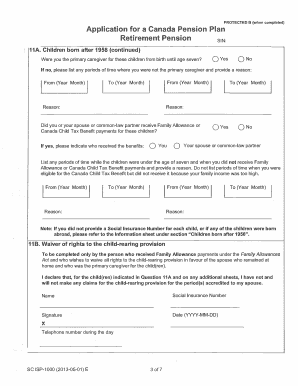
- Complete the section about children born after 1958. Indicate whether you were the primary caregiver for these children until they were seven years old by selecting 'Yes' or 'No'. If 'No', provide the timeframes and reasons for any gaps in caregiving.
- If applicable, specify if you, your spouse or common-law partner received Family Allowance or Canada Child Tax Benefit payments for these children. Indicate who received the benefits.
- List any periods when you did not receive Family Allowance or Canada Child Tax Benefit payments while the children were under seven. Include clear reasons for the absence of benefits.
- If you are the person waiving rights to the child-rearing provision, complete the waiver section. Provide your name, Social Insurance Number, signature, and date.
- In the declaration and signature section, confirm that the information provided is true and complete. Sign and date the application.
- If you signed with a mark or a representative signed on your behalf, provide the necessary details and the witness's information, ensuring all required signatures are accounted for.
- Once you have filled out all sections of the form, review your entries for accuracy. Save your changes, download a copy of the form, and print or share it as needed.
Complete your Canada SC ISP-1000 application online today for a smooth process.
Get form
Experience a faster way to fill out and sign forms on the web. Access the most extensive library of templates available.
The amount you receive from the CPP upon retiring at age 60 depends on your contribution history and how long you worked in Canada. Opting for early retirement reduces your monthly payments, making it vital to plan accordingly. With Canada SC ISP-1000, understanding your CPP options can help you make informed decisions that align with your retirement goals.
Get This Form Now!
Use professional pre-built templates to fill in and sign documents online faster. Get access to thousands of forms.