Loading
Get Ph Maxicare Claims Reimbursement Form 2022-2026
How it works
-

Open form follow the instructions
-

Easily sign the form with your finger
-

Send filled & signed form or save
How to fill out the PH Maxicare Claims Reimbursement Form online
Completing the PH Maxicare Claims Reimbursement Form online is essential for ensuring a smooth and efficient claims process. This guide offers a step-by-step approach to navigating the form effectively, providing clarity and support throughout the process.
Follow the steps to fill out your claims reimbursement form successfully.
- Click ‘Get Form’ button to access the form and open it in your editor.
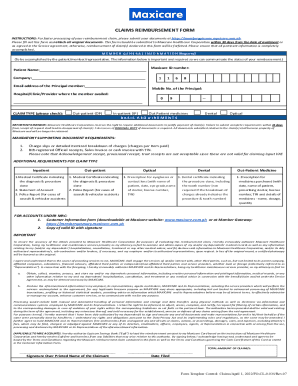
- Begin with member general information. Provide the patient's name, Maxicare ID number, company name, email address of the principal member, and their mobile number. This information is necessary for tracking your reimbursement status.
- Indicate the hospital, clinic, or provider where services were availed. This section helps Maxicare confirm the details of the claim.
- Select the claim type by checking the appropriate box: Out-patient, In-patient, Out Patient medicines, Dental, or Optical. This identification helps in processing the claim correctly.
- Prepare the mandatory supporting documents as outlined in the form. Ensure you have an original charge slip or detailed itemized breakdown of charges, along with a BIR-registered official receipt. Remember, certain types of receipts are not accepted.
- If applicable, collect additional requirements based on your claim type—such as medical certificates or police reports for specific cases. Confirm that all necessary documentation is included.
- Review the completed form and attached documents for completeness and accuracy. Missing or incorrect information can delay your reimbursement process.
- Submit all documents to Maxicare Healthcare Corporation. It is important to send these within 30 days from the date of service to avoid forfeiting your claim.
- After submission, save changes, download, print, or share the form as needed for your records.
Start filling out your PH Maxicare Claims Reimbursement Form online today to ensure a smooth claims process.