Loading
Get Canada Mr Franzen Wtcs Kitchen Lab Planning Sheet 2013-2026
How it works
-

Open form follow the instructions
-

Easily sign the form with your finger
-

Send filled & signed form or save
How to fill out the Canada Mr Franzen WTCS Kitchen Lab Planning Sheet online
This guide provides you with a clear and concise overview of how to effectively fill out the Canada Mr Franzen WTCS Kitchen Lab Planning Sheet online. It is designed to help users navigate through each section, ensuring that no important details are overlooked.
Follow the steps to successfully complete the planning sheet.
- Click the ‘Get Form’ button to access the planning sheet and open it for editing.
- Fill in your group number and lab details at the top of the sheet, ensuring all information is accurate.
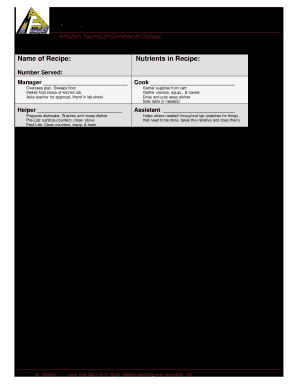
- Enter the name of the recipe you will be preparing. Be clear and concise in your description.
- Note any absences for the lab in the designated area. This ensures that all team roles are adequately filled.
- List the nutrients in the recipe. This helps in understanding the health aspects of the meal being prepared.
- Indicate the number of servings the recipe yields. This is important for meal planning.
- Assign roles by filling in the manager, cook, helper, and assistant sections. Clearly define their respective responsibilities.
- Outline all ingredients, including amounts and corresponding food preparation tasks. Assign these tasks to specific team members to ensure accountability.
- In the utensils section, list the amounts of utensils needed, noting which team member will handle each tool.
- Complete the equipment section by noting any specific tools required for the lab.
- After completing the planning sheet, review all sections for accuracy and clarity.
- Finally, save your changes, and download or print the form for submission. Make sure to share as necessary.
Complete your documents online for efficient management.