Loading
Form preview
  • US Legal Forms
  • Other Templates
  • More Forms
  • More Multi-State Forms
  • Md State Retirement Agency Form 20 2019

Get Md State Retirement Agency Form 20 2019-2026

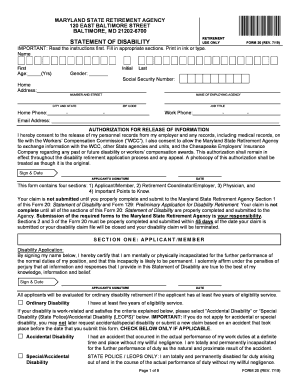
MARYLAND STATE RETIREMENT AGENCY 120 EAST BALTIMORE STREET BALTIMORE, MD 212026700 RETIREMENT USE OVERSTATEMENT OF DISABILITYFORM 20 (REV. 7/19)IMPORTANT: Read the instructions first. Fill in appropriate.

How it works

  1. Open form

    Open form follow the instructions

  2. Easily sign form

    Easily sign the form with your finger

  3. Share form

    Send filled & signed form or save

How to fill out the MD State Retirement Agency Form 20 online

Filling out the Maryland State Retirement Agency Form 20 is a crucial step for individuals seeking disability retirement. This guide provides clear, step-by-step instructions to assist users in completing the form accurately and efficiently online.

Follow the steps to complete the Form 20 accurately.

  1. Use the ‘Get Form’ button to access the form and open it in your preferred online editor.
  2. Begin with Section One: Applicant/Member. Fill in your name, age, gender, and Social Security number. Ensure that all information is accurate and complete.
  3. Provide your home address along with the name of your employing agency. Include your home and work phone numbers and email address.
  4. In the Authorization for Release of Information section, consent to the release of your personnel and medical records by signing and dating the form.
  5. Check the appropriate box under Disability Application to specify whether you are applying for Ordinary Disability, Accidental Disability, or Special Disability. Complete all relevant fields to provide details about your disability.
  6. If applying for Accidental or Special Disability, describe each accident that you believe caused your disability, including relevant dates, times, and locations. Provide details about witnesses if applicable.
  7. Respond to additional questions regarding your disability and work-related history, ensuring that you attach any necessary supplementary pages.
  8. Section Two must be completed and signed by your Retirement Coordinator/Employer, who will provide necessary employment details and verify your employment status.
  9. Section Three involves a Physician's Medical Report. Ensure your healthcare provider completes and submits this section directly to the Medical Board of the State Retirement Agency.
  10. Finally, review all sections for accuracy, save your changes, and proceed to download, print, or share the completed form as required.

Take the first step towards your disability retirement by completing the MD State Retirement Agency Form 20 online today.

Get form

Experience a faster way to fill out and sign forms on the web. Access the most extensive library of templates available.
Get form

Related content

form_20.pdf - Maryland State Retirement and...
This form contains four sections: 1) Applicant/Member, 2) Retirement Coordinator/Employer...
Learn more
APPLICATION FOR MEMBERSHIP
Purpose of this Form: The Application for Membership form provides the Maryland State...
Learn more
Application for Withdrawal of Accumulated...
By completing the Form 5, you are terminating your membership in the Maryland State...
Learn more

Related links form

CITY OF RAEFORD ZONING PERMIT APPLICATION - Raefordcity Excavator Attachments Training Ppt 2020 Immigration Form Model 2020 Homeport Sea Cadet

Questions & Answers

Get answers to your most pressing questions about US Legal Forms API.

Contact support

And, depending on the position and agency, some will receive additional pay increases and bonuses. These increases are in addition to the previously agreed upon 2% cost of living adjustment (COLA) that goes into effect July 1 of this year.

Those who retired after July 2019 (August 2019 or later) will receive their first COLA increase in July 2021. The COLA does not apply to retired Maryland legislators, judges or governors. Those retirees receive adjustments based on the specific terms of their plans. Q.

As occurs each year, the Maryland State Retirement and Pension System (MSPRS) has announced the annual cost of living adjustment (COLA) rate. The COLA rate of 4.698% becomes effective July 1, 2022.

6) Cost of Living Adjustment – Effective no later than July 1, 2023, a general cost of living adjustment wage increase (COLA) consisting of 2% will be added to each grade and step of the pay plan(s) affecting bargaining unit employees.

University System of Maryland History of COLA & Merit Increases FYState COLANotes20212.0%2% COLA increase delayed until 1/1/202120203.0% + 1.0%3.0% COLA granted on 7-1-2019; 1.0% COLA increase delayed until 1-1-2020.20192.0% + 0.5%2.0% COLA delayed until 1/1/2019; 0.5% COLA and $500 bonus delayed until 4/1/2019.20180%53 more rows

As occurs each year, the Maryland State Retirement and Pension System (MSPRS) has announced the annual cost of living adjustment (COLA) rate. The COLA rate of 4.698% becomes effective July 1, 2022. This is a noticeable increase from the 2021 COLA.

Retirement eligibility at age 65 with at least 10 years of service, or age 60 with at least 15 years of service at a reduced benefit.

The annual COLA is applied ing to the yearly Consumer Price Index (CPI). The CPI for 2023 will increase by 8.46 percent. As a result, members of the Employees' Retirement and Pension System will receive a COLA to their gross pension payments, effective January 1, 2023.

Get This Form Now!

Use professional pre-built templates to fill in and sign documents online faster. Get access to thousands of forms.
Get form
If you believe that this page should be taken down, please follow our DMCA take down processhere.
Get MD State Retirement Agency Form 20
Get form
  • Adoption
  • Bankruptcy
  • Contractors
  • Divorce
  • Home Sales
  • Employment
  • Identity Theft
  • Incorporation
  • Landlord Tenant
  • Living Trust
  • Name Change
  • Personal Planning
  • Small Business
  • Wills & Estates
  • Packages A-Z
  • Affidavits
  • Bankruptcy
  • Bill of Sale
  • Corporate - LLC
  • Divorce
  • Employment
  • Identity Theft
  • Internet Technology
  • Landlord Tenant
  • Living Wills
  • Name Change
  • Power of Attorney
  • Real Estate
  • Small Estates
  • Wills
  • All Forms
  • Forms A-Z
  • Other Templates
  • Legal Hub
  • About Us
  • Help Portal
  • Legal Resources
  • Blog
  • Affiliates
  • Contact Us
  • Delete My Account
  • Site Map
  • Industries
  • Forms in Spanish
  • Localized Forms
  • State-specific Forms
  • Forms Kit
  • Real Estate Handbook
  • All Guides
  • Notarize
  • Incorporation services
  • For Consumers
  • For Small Business
  • For Attorneys
  • USLegal
  • FormsPass
  • pdfFiller
  • signNow
  • altaFlow
  • DocHub
  • Instapage
Form Packages
  • Adoption
  • Bankruptcy
  • Contractors
  • Divorce
  • Home Sales
  • Employment
  • Identity Theft
  • Incorporation
  • Landlord Tenant
  • Living Trust
  • Name Change
  • Personal Planning
  • Small Business
  • Wills & Estates
  • Packages A-Z
Form Categories
  • Affidavits
  • Bankruptcy
  • Bill of Sale
  • Corporate - LLC
  • Divorce
  • Employment
  • Identity Theft
  • Internet Technology
  • Landlord Tenant
  • Living Wills
  • Name Change
  • Power of Attorney
  • Real Estate
  • Small Estates
  • Wills
  • All Forms
  • Forms A-Z
  • Other Templates
Customer Service
  • Legal Hub
  • About Us
  • Help Portal
  • Legal Resources
  • Blog
  • Affiliates
  • Contact Us
  • Delete My Account
  • Site Map
  • Industries
  • Forms in Spanish
  • Localized Forms
  • State-specific Forms
  • Forms Kit
Legal Guides
  • Real Estate Handbook
  • All Guides
Prepared for you
  • Notarize
  • Incorporation services
Our Customers
  • For Consumers
  • For Small Business
  • For Attorneys
Our Sites
  • USLegal
  • FormsPass
  • pdfFiller
  • signNow
  • altaFlow
  • DocHub
  • Instapage
Social Media
Call us now toll free:
+1 833 426 79 33
As seen in:
© Copyright 1999-2026 airSlate Legal Forms, Inc. 17 Station Street, Ste. 203, Brookline, MA 02445
  • Your Privacy Choices
  • Terms of Service
  • Privacy Notice
  • Content Takedown Policy
  • Bug Bounty Program