Loading
Form preview
  • US Legal Forms
  • Other Templates
  • More Forms
  • More Multi-State Forms
  • Canada Form Iprc 3 S 2010

Get Canada Form Iprc 3 S 2010-2026

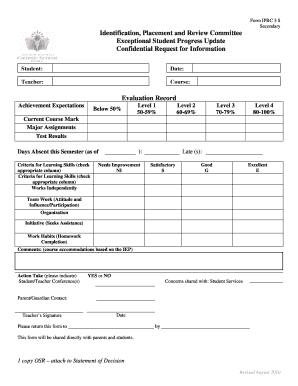
Form PRC 3 S Secondary Identification, Placement and Review Committee Exceptional Student Progress Update Confidential Request for Information Student: Date: Teacher: Course: Evaluation Record Achievement.

How it works

  1. Open form

    Open form follow the instructions

  2. Easily sign form

    Easily sign the form with your finger

  3. Share form

    Send filled & signed form or save

How to fill out the Canada Form IPRC 3 S online

Filling out the Canada Form IPRC 3 S is an essential step in updating the progress of exceptional students. This guide provides a simple, step-by-step approach to ensure users can easily complete the form online.

Follow the steps to successfully fill out the Canada Form IPRC 3 S.

  1. Click ‘Get Form’ button to obtain the form and open it in the editor.
  2. Begin by filling in the student's name and the date on the form, which are essential identifiers for tracking student progress.
  3. Next, input the teacher's name and the course associated with the evaluation. This will help specify the context of the report.
  4. In the evaluation record section, provide information regarding the current course mark. Include major assignments and test results in the designated areas.
  5. Record the days the student has been absent this semester. This data is important for understanding attendance-related impacts on progress.
  6. For the criteria of learning skills, check the appropriate columns to reflect the student's performance in various skills like working independently, teamwork, organization, initiative, and work habits.
  7. In the comments section, note any course accommodations based on the Individualized Education Plan (IEP) to provide further context for the student's learning needs.
  8. Indicate whether a student/teacher conference has taken place by selecting YES or NO.
  9. Share any concerns that have been expressed with student services and include the contact information for the parent or guardian.
  10. Finally, have the teacher sign and date the form to validate the information provided.
  11. Ensure to return the completed form to the specified recipient by the due date provided on the form.
  12. At the end, users can save changes, download the filled form, print it for physical records, or share it as required.

Start completing the Canada Form IPRC 3 S online today for an efficient processing experience.

Get form

Experience a faster way to fill out and sign forms on the web. Access the most extensive library of templates available.
Get form

Related content

Identification, Placement and Review Committees in...
by L Reid · 2020 · Cited by 1 — The IPRC, in its present form, was developed in the...
Learn more
DOCUMENT RESUME - ERIC
by M Cheng · 1992 · Cited by 33 — Canada) described in this report was monitored for 2...
Learn more
RSX-11 M/M-PLUS and Micro/RSX - bitsavers.org
NEW DEVICE SUPPORT. You can specify any of the following new devices as the crash dump...
Learn more

Related links form

UBMD Obstetrics & Gynecology New Patient Packet - Dr. Ablove Patient 2018 ABOG Application For Certification In Obstetrics And Gynecology With Added Qualification In 2014 Berkley Asset Protection Fine Art + Collectibles Insurance Application 2017 IDSOG Application For Membership 2020

Questions & Answers

Get answers to your most pressing questions about US Legal Forms API.

Contact support

Identification, placement and review committees ( IPRC ) The IPRC : decides if the student should be identified as exceptional. identifies areas of the student's exceptionality, ing to specific categories and definitions.

A clear understanding of the student's strengths and needs is fundamental to the development of an effective special education program and the provision of appropriate accommodations and services to facilitate the student's learning. A description of the student's strengths and needs must be recorded in the IEP .

There is not one universal method to identifying students with learning disabilities. However, to identify a particular disability, students can be given achievement tests, and their internalizing or externalizing behaviors can be examined.

An IEP must be developed for every student who has been identified as an “exceptional pupil” by an Identification, Placement, and Review Committee ( IPRC ).

The TDSB has stated that a student with ADHD may receive an IEP, if they are impaired, but will not allow an IPRC. This leaves the implementation of an IEP at the school's discretion and also allows it to be pulled at the school's discretion.

The IEP should: Meet the child's academic, development, and functional needs that result from the disability; Enable the child to be involved in and progress in the general curriculum; Meet each of the child's other educational needs that result from the child's disability.

An Individual Education Plan (IEP) is a written plan that describes special education programs and/or services for a student. It is based on a student's profile of strengths and areas for growth. This will be developed in consultation with the parent/guardian/caregiver and with the student, where appropriate.

Who requests an IPRC? The principal of the student's school is responsible for requesting an IPRC if: They have received a written request from the parents. Neither the school board nor the principal can deny this request.

Get This Form Now!

Use professional pre-built templates to fill in and sign documents online faster. Get access to thousands of forms.
Get form
If you believe that this page should be taken down, please follow our DMCA take down processhere.
Get Canada Form IPRC 3 S
Get form
  • Adoption
  • Bankruptcy
  • Contractors
  • Divorce
  • Home Sales
  • Employment
  • Identity Theft
  • Incorporation
  • Landlord Tenant
  • Living Trust
  • Name Change
  • Personal Planning
  • Small Business
  • Wills & Estates
  • Packages A-Z
  • Affidavits
  • Bankruptcy
  • Bill of Sale
  • Corporate - LLC
  • Divorce
  • Employment
  • Identity Theft
  • Internet Technology
  • Landlord Tenant
  • Living Wills
  • Name Change
  • Power of Attorney
  • Real Estate
  • Small Estates
  • Wills
  • All Forms
  • Forms A-Z
  • Other Templates
  • Legal Hub
  • About Us
  • Help Portal
  • Legal Resources
  • Blog
  • Affiliates
  • Contact Us
  • Delete My Account
  • Site Map
  • Industries
  • Forms in Spanish
  • Localized Forms
  • State-specific Forms
  • Forms Kit
  • Real Estate Handbook
  • All Guides
  • Notarize
  • Incorporation services
  • For Consumers
  • For Small Business
  • For Attorneys
  • USLegal
  • FormsPass
  • pdfFiller
  • signNow
  • altaFlow
  • DocHub
  • Instapage
Form Packages
  • Adoption
  • Bankruptcy
  • Contractors
  • Divorce
  • Home Sales
  • Employment
  • Identity Theft
  • Incorporation
  • Landlord Tenant
  • Living Trust
  • Name Change
  • Personal Planning
  • Small Business
  • Wills & Estates
  • Packages A-Z
Form Categories
  • Affidavits
  • Bankruptcy
  • Bill of Sale
  • Corporate - LLC
  • Divorce
  • Employment
  • Identity Theft
  • Internet Technology
  • Landlord Tenant
  • Living Wills
  • Name Change
  • Power of Attorney
  • Real Estate
  • Small Estates
  • Wills
  • All Forms
  • Forms A-Z
  • Other Templates
Customer Service
  • Legal Hub
  • About Us
  • Help Portal
  • Legal Resources
  • Blog
  • Affiliates
  • Contact Us
  • Delete My Account
  • Site Map
  • Industries
  • Forms in Spanish
  • Localized Forms
  • State-specific Forms
  • Forms Kit
Legal Guides
  • Real Estate Handbook
  • All Guides
Prepared for you
  • Notarize
  • Incorporation services
Our Customers
  • For Consumers
  • For Small Business
  • For Attorneys
Our Sites
  • USLegal
  • FormsPass
  • pdfFiller
  • signNow
  • altaFlow
  • DocHub
  • Instapage
Social Media
Call us now toll free:
+1 833 426 79 33
As seen in:
© Copyright 1999-2026 airSlate Legal Forms, Inc. 17 Station Street, Ste. 203, Brookline, MA 02445
  • Your Privacy Choices
  • Terms of Service
  • Privacy Notice
  • Content Takedown Policy
  • Bug Bounty Program