Loading
Get Canada Income Confirmation Form(icf)
How it works
-

Open form follow the instructions
-

Easily sign the form with your finger
-

Send filled & signed form or save
How to fill out the Canada Income Confirmation Form (ICF) online
Filling out the Canada Income Confirmation Form (ICF) online is an important process for students seeking financial assistance in Newfoundland and Labrador. This guide provides clear instructions on how to accurately complete the form, ensuring you meet eligibility requirements for funding.
Follow the steps to fill out the Canada Income Confirmation Form online
- Click ‘Get Form’ button to obtain the form and open it in your preferred editing software.
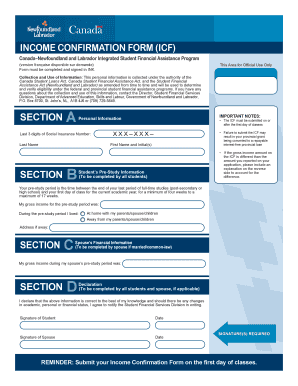
- In Section A, input your personal information. Start with the last three digits of your Social Insurance Number, followed by your last name, first name, and any initials. Ensure that all details are correct.
- In Section B, provide your gross income for the pre-study period. Your pre-study period is defined as the time between your last full-time studies and the first day of classes. Select whether you lived at home with family or away and provide the address if applicable.
- If you are married or in a common-law partnership, complete Section C with your spouse’s gross income during their pre-study period.
- In Section D, both you and your spouse (if applicable) must declare the accuracy of the information provided. Sign and date where indicated.
- Once all sections are filled out, review the form for completeness and accuracy. Save your changes, and then you can choose to download, print, or share the form as required.
Complete your Canada Income Confirmation Form online today to ensure timely processing of your financial assistance.
Apply for Federal Student Aid (Complete the FAFSA® Form) The Free Application for Federal Student Aid (FAFSA®) form allows you to apply for federal grants, work study funds, and loans, all in one application.