Loading
Get Nz Nzpvs-cs 2018
How it works
-

Open form follow the instructions
-

Easily sign the form with your finger
-

Send filled & signed form or save
How to fill out the NZ NZPVS-CS online
Completing the NZ NZPVS-CS form online is a straightforward process that helps ensure the safety of vulnerable individuals in New Zealand. This guide provides step-by-step instructions to assist users in accurately filling out the necessary sections of the form.
Follow the steps to complete the NZ NZPVS-CS form effectively.
- Click the ‘Get Form’ button to obtain the form and open it in the editor. This will allow you to start filling out the required information.
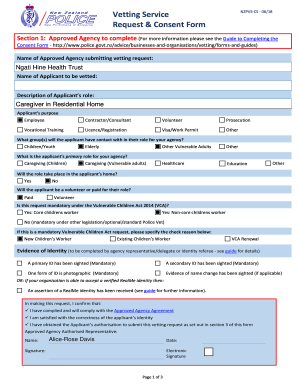
- In Section 1, the approved agency must complete their details. Include the name of the agency submitting the vetting request and the name of the applicant to be vetted. Describe the applicant's role, such as caregiver in a residential home.
- Specify the applicant's purpose for the vetting request, selecting options like employee, contractor, volunteer, or others that apply.
- Indicate which groups the applicant will have contact with in their role, marking relevant options like children/youth, elderly, or other vulnerable adults.
- Identify the applicant's primary role for your agency, choosing from caregiving options or others as applicable.
- Answer whether the role will take place in the applicant's home by selecting 'Yes' or 'No.'
- Specify if the applicant will be a volunteer or paid for their role, marking the appropriate option.
- Determine if the request is mandatory under the Vulnerable Children Act 2014 by selecting 'Yes' or 'No.' If yes, specify the check reason.
- Provide evidence of identity as required, ensuring both primary and secondary IDs are documented along with any necessary name change evidence.
- In the applicant's section, complete all mandatory personal information fields, including family name, given name(s), date of birth, and place of birth.
- Return to Section 3 to complete the consent to release information. Read through the various points and confirm understanding before signing.
- Once all sections are completed, ensure all signatures are provided, and review the information for accuracy.
- Finally, save changes, download, print, or share the completed form as required for your records or submission.
Start filling out the NZ NZPVS-CS form online today to ensure a safe environment for all.
Get form
Experience a faster way to fill out and sign forms on the web. Access the most extensive library of templates available.
Get This Form Now!
Use professional pre-built templates to fill in and sign documents online faster. Get access to thousands of forms.