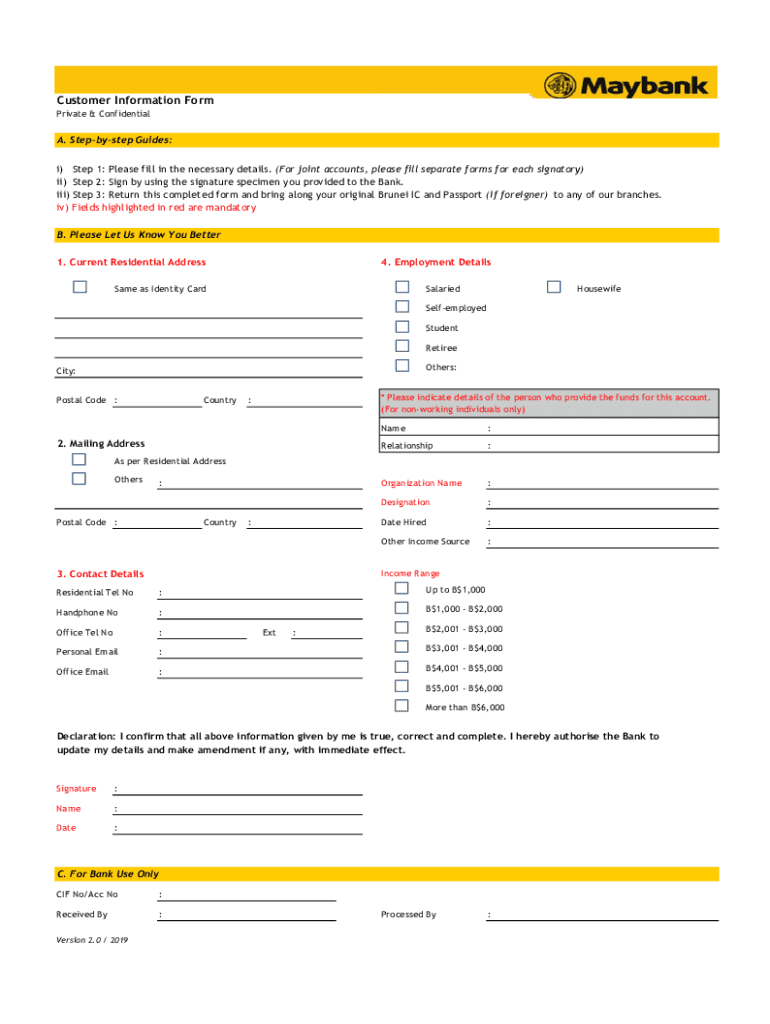
Customer Information Form Private & ConfidentialA. Stepbystep Guides: i) Step 1: Please fill in the necessary details. (For joint accounts, please fill separate forms for each signatory) ii) Step.
Loading

Open form follow the instructions

Easily sign the form with your finger

Send filled & signed form or save
How to fill out the MY Maybank Customer Information Form online
This guide provides a clear and comprehensive overview of how to effectively complete the MY Maybank Customer Information Form online. By following these steps, you can ensure your information is submitted accurately and efficiently.
Follow the steps to complete your form successfully.
- Click ‘Get Form’ button to obtain the form and open it in the editor.
- Fill in the necessary details in the form. For joint accounts, remember to fill out separate forms for each signatory.
- Use the signature specimen you provided to the bank to sign the form.
- Prepare to return the completed form by bringing your original Brunei IC and passport (if you are a foreigner) to any of the bank's branches.
- Ensure all fields highlighted in red are completed, as these are mandatory.
- For the current residential address, provide the complete address information, including city and postal code.
- Indicate employment details, selecting the appropriate status such as salaried, self-employed, or others. Also, fill out the information for the person who provided the funds if you are a non-working individual.
- Fill in contact details, including residential telephone number, handphone number, office telephone number, and personal and office email addresses.
- Provide your income range based on the specified categories.
- Review and confirm the accuracy of the information you have entered. Sign the declaration stating that all provided information is true, correct, and complete.
- Finally, save your changes, and you can download, print, or share the completed form as needed.
Begin completing your documents online today to streamline your banking experience.
Experience a faster way to fill out and sign forms on the web. Access the most extensive library of templates available.
Related content
Any renewal, once approved by the Bank, shall be affected by way of you or your agent and...
by SS Alam · 2009 · Cited by 53 — question is whether customers will accept the...
The Malaysian Electronic Payment System (MEPS) is an interbank network service provider in...
Get answers to your most pressing questions about US Legal Forms API.
What are the Bank account details?
Account Information means any information relating to the Account including without limitation the account number, account balance or value, gross receipts, withdrawals and payments from the account.
Where can I find my Maybank account number?
You can view your account number by logging in to your Maybank PH app. Enter deposit code* as your transaction code, mobile number of recipient, amount and contact number. Please ensure that the first character of deposit code* must be in capital letter.
How do I print my Maybank account details?
How do I print/download my bill or statement? Go to "Statement Summary" or the "Statement Details" page. Select the "Download/Print" button. Your statement will be displayed in PDF format. Click on the PDF icon to open your statement. Proceed to print or select the "Save" button to download it to your computer.
How can I check my Maybank account online?
Digital Banking (Quick Balance) Launch Maybank MY apps. Select Quick Balance. Key in Maybank Account or Credit Card Number, ID Number and Device Name. Key in One Time Password (OTP) sent to mobile phone. Create PIN number.
How do I log into my Maybank account?
Digital Banking (Maybank2u) Go to .maybank2u.com.my. Select Register Now. Key in your ATM / Debit / Credit Card / Access Number and PIN Number. Create account profile and request for TAC. Select security image, phrase and question. Click Done to complete the registration.
How do I change my personal details with Maybank?
How to add contact details? Login with your Maybank2u access. Go to 'Settings' Select 'Personal' Select 'Additional Contact Details' tab. Select the type of contact from the dropdown menu. Key in your contact number. Select 'Save' Select 'Confirm' to complete the changes.
How do I change my Maybank mobile number overseas?
Update your new mobile number For an overseas mobile number - You may contact Maybank Group Customer Care at 1300 88 66 88 or +60378443696 (overseas) to help update your overseas mobile number.
How do I check my Maybank account details?
You can view or download your statements via Maybank2u website by following the steps below. Log in via .maybank2u.com.my. Select the account to view its monthly statement. Click 'View Statement' and your statement will be displayed in PDF format. Click the dropdown to choose a different month's statement.
Use professional pre-built templates to fill in and sign documents online faster. Get access to thousands of forms.
If you believe that this page should be taken down, please follow our DMCA take down process here.