Loading
Get My Alliance Bank 88103-w 2016-2026
How it works
-

Open form follow the instructions
-

Easily sign the form with your finger
-

Send filled & signed form or save
How to fill out the MY Alliance Bank 88103-W online
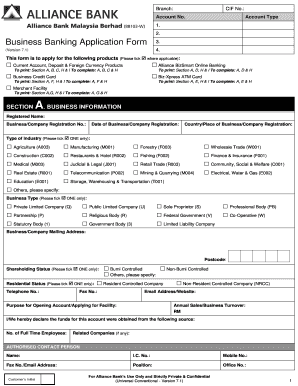
This guide provides step-by-step instructions for completing the MY Alliance Bank 88103-W form online. It aims to assist users, regardless of their experience level, in navigating the form efficiently and accurately.
Follow the steps to successfully complete the MY Alliance Bank 88103-W online form.
- Click the ‘Get Form’ button to access the MY Alliance Bank 88103-W form. Ensure that you have a reliable internet connection to avoid disruptions while filling it out.
- Begin with Section A, labeled 'Business Information.' Provide your registered business name, business registration number, and date of registration. Fill in the country of registration and select the industry type that best describes your business by ticking the appropriate box.
- Continue to the Business Type section. Select the appropriate type of business entity by ticking the box corresponding to your structure, such as 'Private Limited Company' or 'Sole Proprietor.'
- Complete the mailing address for your business and provide a postcode. Include your contact information, such as telephone number, fax number, and email address.
- In Section B, 'Opening of Account,' indicate the type of account you wish to open, such as 'Current Account' or 'Savings Account.' If applicable, select the foreign currency account options and specify currency types as needed.
- Next, fill out the Nomination of Authorized Personnel section. Name individuals you authorize to carry out transactions on behalf of your business. Provide their contact details and select the roles they will fulfill.
- Proceed to Section C, 'Authorized Signatories & Account Operation Mandate.' List the authorized signatories with their details, including identification numbers and specimen signatures. Specify the operation of the account based on your chosen preference.
- In Section D, apply for Alliance BizSmart Online Banking if desired. Choose the preferred module and complete details concerning user management and account linkage as necessary.
- Fill out Section H with your declarations, ensuring you agree to all terms and conditions. Confirm that all information provided is accurate and sign where required.
- Once all sections are completed, review the form for accuracy. Save any changes you have made, then download, print, or share the completed document as necessary.
Get started today by filling out the MY Alliance Bank 88103-W form online.
Payment (Transfer, JomPay, Card, Loan & Prepaid Reload) At the payment page, select the ( ) icon found in the From column. ... At the To column, enter the beneficiary's account number, and then select Confirm. At the Details page, enter the rest of the transfer details. At the Review page, confirm the transfer details.