Loading
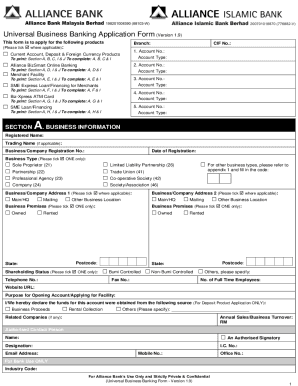
Get My Alliance Bank 88103-w 2022-2025
How it works
-

Open form follow the instructions
-

Easily sign the form with your finger
-

Send filled & signed form or save
How to fill out the MY Alliance Bank 88103-W online
Filling out the MY Alliance Bank 88103-W form is an essential step for those looking to apply for various banking products offered by Alliance Bank. This guide will provide clear and concise instructions on completing each section of the form online, ensuring a smooth application process.
Follow the steps to successfully complete your online application.
- Click the ‘Get Form’ button to obtain the MY Alliance Bank 88103-W form and open it in an online editor.
- Begin with Section A, Business Information. Fill in the registered name of your business, trading name if applicable, and business registration number. Provide the date of registration and select the type of business by ticking the appropriate box.
- Complete the address fields. Indicate if this is your main headquarters, mailing address, or other location by checking the relevant boxes. Provide the postcode and state for both address sections.
- Input the shareholding status, specify your business telephone number, fax number, and number of full-time employees. If applicable, include the website URL.
- State the purpose for opening the account or applying for the facility and declare the source of funds for deposit applications.
- Proceed to Section B, Deposit Products. Select the type(s) of accounts you wish to apply for by ticking the appropriate boxes. If choosing Foreign Currency Accounts or Fixed Deposits, specify the currency type as needed.
- In Section C, Key Personnel & Account Operation Mandate, fill in the names and details of the authorized signatories for the account operation. Indicate their roles and specify how many signatures are required for transactions.
- Follow the prompts for Sections D (registration for online banking), E (application for merchant facility), F (loan/financing applications), and so on. Complete each section by following the specific instructions provided for each.
- Review the completed form for accuracy. Ensure all required fields are filled and all declarations are signed where necessary.
- Finally, save your changes. You may download, print, or share the form as required once completed.
Start filling out your MY Alliance Bank 88103-W form online today for a seamless banking experience.
Payment (Transfer, JomPay, Card, Loan & Prepaid Reload) At the payment page, select the ( ) icon found in the From column. ... At the To column, enter the beneficiary's account number, and then select Confirm. At the Details page, enter the rest of the transfer details. At the Review page, confirm the transfer details.
Industry-leading security and compliance
US Legal Forms protects your data by complying with industry-specific security standards.
-
In businnes since 199725+ years providing professional legal documents.
-
Accredited businessGuarantees that a business meets BBB accreditation standards in the US and Canada.
-
Secured by BraintreeValidated Level 1 PCI DSS compliant payment gateway that accepts most major credit and debit card brands from across the globe.